Archive for the ‘TSAPI’ Category

ctiSVR 1.2.6 Release

Posted: September 14, 2016 in News, TSAPI

13 September 2016, ctiSVR 1.2.6 just released. This version 

1. Integration with CallAban for agent state logging, parameters ivr_callloghost, ivr_calllogport and ivr_calllogerrfile are introduced.
2. The ctiClient.ocx supports MyExtension() method.
3. Supports json payload by the REST interface.
4. Fixed one step conference and one step transfer call fail bug.
5. Add ListExtension() function to list out all extensions that monitored by ctiSVR.
6. Supports CallQueued and CallNetworkReached events.
7. Fixed ivrSVR and ctiClient.ocx to support userdata in XML format.

ctiSVR Open CTI for Salesforce

Posted: August 13, 2016 in TSAPI

Introduction

This post is about the configuration of CtiSVR (also known as ivrSVR)  with Salesforce Open CTI architecture. I have created a CtiSVR Open CTI package which contains a call center definition file and a sample html file, the two files allow you to integrate CtiSVR with Salesforece and enable Salesforce’s Click to Dial and ScreenPop features. Also a sample Softphone is implemented by the html file, you can use the Softphone to login Avaya ACD and perform CTI call controls. After you understand the logic behind, you can change the html file to fit your call center operation.

Creating A Call Center 

  • Click Setup->Customize->Call Center->Call Centers
  • callcentersetup
  • Click Call Centers->Import->Choose File->Select ctiSVROpenCTI.xml->Import
  • Click Manage Call Center Users->Add More Users->Find->Select your users->Add to Call Center
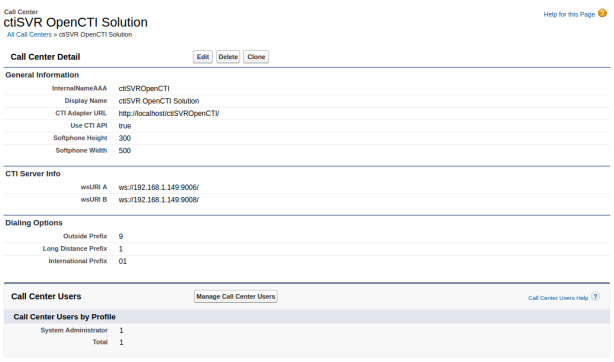
  • You can see the following screen after the Call Center definition file is imported and your users are added to the Call Center
  • importsuccess
  • You can move the ctiSVROpenCTI folder and the files to your WEB server, you need to change the CTI Adapter URL after you have changed the location

CtiSVR Configuration 

  • Firstly, you need to follow this guide to install and configure CtiSVR
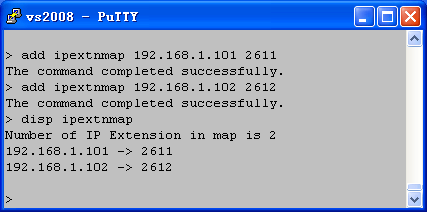
  • In order to support “free seating”, we need to use an IP address to map to an agent extension, you can add the mapping of IP address to extension by CtiSVR tcpgate console command, for example
    • add ipextnmap 192.168.1.101 2611
    • You can display the mapping by the following tcpgate console command, for example
    • disp ipextnmap 
    • ipextnmap
  • You also need a WebSocket port for the integration of CtiSVR and Salesforce, to add a WebSocket port, enter the following tcpgate console commands
    • add tcp 9006 * * custom ivrsvrws
    • You can display all the listening ports of CtiSVR by the following tcpgate console command
    • disp tcp all
    • ipextnmap

CtiSVR Salesforce Sample Softphone

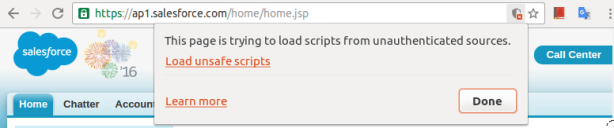
  • After Login Salesforce, the browser will prevent loading and execution of unsafe script (the CTI Adapter URL) from unauthorized site , for example
  • scriptexception
  • If you are using Chrome, click the Load Unsafe Script to load the Sample Softphone script.
  • loadunsafescripts
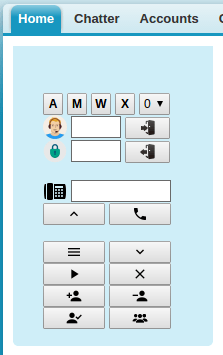
  • The Sample Softphone is appeared on the left hand side of the Salesforce
  • softphone

Sample Softphone Programming Details 

  • The source code of the sample Softphone is on here, most of the code can be found in the index.html file
  • When the page is load, it gets the configuration string that contains all details of the call center 
    // the page is loaded
    window.addEventListener("load", sforce.interaction.cti.getCallCenterSettings(getCallCenterSettingsCallback), false);
  • In the getCallCenterSettingsCallback function, the configString is in JSON format. Since the Softphone is connected to CtiSVR using WebSocket, the following is to get the production and backup WebSocket URIs
    var jsonObj = JSON.parse(configString);
    wsUriA = jsonObj["/ServerInfo/wsURIA"];
    wsUriB = jsonObj["/ServerInfo/wsURIB"];
  • In the getCallCenterSettingsCallback function, we also get the international, long distance and outside dialing prefix by the following 
    internationalPrefix = jsonObj["/reqDialingOptions/reqInternationalPrefix"];
    longDistPrefix = jsonObj["/reqDialingOptions/reqLongDistPrefix"];
    outsidePrefix = jsonObj["/reqDialingOptions/reqOutsidePrefix"];
  • After that, a WebSocket is created to connect to CtiSVR. Also set the callback functions for the WebSocket
    webSocket = new WebSocket(wsUriA);
    webSocket.onopen = function(evt) {
        onWebSocketOpen(evt)
    };
    webSocket.onclose = function(evt) {
        onWebSocketClose(evt)
    };
    webSocket.onmessage = function(evt) {
        onWebSocketMessage(evt)
    };
    webSocket.onerror = function(evt) {
        onWebSocketError(evt)
    };
  • When the WebSocket is connected to the CtiSVR, the callback function onWebSocketOpen will be invoked. We then submit a request (myextension) to CtiSVR to query the agent extension based on the IP address of the browser
    // Callback of WebSocket onOpen
    function onWebSocketOpen(evt) {
        webSocket.send(JSON.stringify({
            id: MSGID_GETEXTENSION,
            request: "myextension"
        }));
    }
  • If there is reply from CtiSVR, callback function onWebSocketMessage will be invoked. The response message also in JSON format. If the myextension command is successful, the extension number can be found in the response message. We then store the extension number and submit another command (startmonitor) to monitor the agent extension for unsolicited telephony events. 
    if (id==MSGID_GETEXTENSION) {
        if (jsonObj["result"]=='success') {
            myExtension = jsonObj["extension"];
            webSocket.send(JSON.stringify({
                id: MSGID_STARTMONITOR,
                request: "startmonitor",
                extension: myExtension
            }));
        } else {
            alert('SoftPhone get CTI extension failed.');
        }
    }
  • If the startmonitor command is successful, querydeviceinfo command is sent to CtiSVR
    } else if (id==MSGID_STARTMONITOR) {
        if (jsonObj["result"]=='success') {
            webSocket.send(JSON.stringify({
                id: MSGID_QUERYDEVICEINFO,
                request: "querydeviceinfo",
                extension: myExtension
            }));
        } else {
            alert('SoftPhone monitor CTI extension failed.');
        }
    }
  • We then set the state of the Softphone by the result of querydeviceinfo. Also register Click to Dial callback function and enable Click to Dial with Salesforce
    } else if (id==MSGID_QUERYDEVICEINFO) {
        if (jsonObj["result"]=='success') {
            myAgentId = jsonObj["associateddevice"];
            if (myAgentId) {
                document.getElementById('txtAgentId').value = myAgentId;
                document.getElementById('txtPasswd').value = "*****";
                document.getElementById('btnSubmitLogin').disabled = true;
                document.getElementById('btnSubmitLogout').disabled = false;
                document.getElementById('txtAgentId').disabled = true;
                document.getElementById('txtPasswd').disabled = true;
                webSocket.send(JSON.stringify({
                    id: MSGID_QUERYAGENTSTATE,
                    request: "queryagentstate",
                    extension: myExtension
                }));
            } else {
                document.getElementById('btnSubmitLogin').disabled = false;
                document.getElementById('btnSubmitLogout').disabled = true;
                document.getElementById('txtAgentId').disabled = false;
                document.getElementById('txtPasswd').disabled = false;
                document.getElementById('btnAuto').disabled = true;
                document.getElementById('btnManual').disabled = true;
                document.getElementById('btnAcw').disabled = true;
                document.getElementById('btnAux').disabled = true;
                webSocket.send(JSON.stringify({
                    id: MSGID_SNAPSHOT,
                    request: "snapshot",
                    extension: myExtension
                }));
            }
            // Register Click to Dial Callback
            sforce.interaction.cti.onClickToDial(onClickToDialCallback);
            // Enable Click to Dial
          sforce.interaction.cti.enableClickToDial(enableClickToDialCallback);
        }
    }
  • The Softphone is now ready for Click to Dial and ScreenPop. When user clicks a telephone number, callback function onClickToDialCallback is invoked. Before a number is submitted to CtiSVR, we need to format a prefix number and remove all characters such as “+()” and SPACE, then makecall or consultation command is sent to CtiSVR which depends on agent state 
    var onClickToDialCallback = function (response) {
        if (response.result) {
            var prefix;
            var jsonObj = JSON.parse(response.result);
            var number = jsonObj["number"];
            if (number.indexOf("+")>=0) {
                prefix = outsidePrefix + internationalPrefix;
            } else if (number.indexOf("(")>=0 && number.indexOf(")")>=0) {
                prefix = outsidePrefix + longDistPrefix;
            }
            number = number.replace(/\+/g, '');
            number = number.replace(/\s+/g, '');
            number = number.replace(/\(/g, '');
            number = number.replace(/\)/g, '');
            number = number.replace(/-/g, '');
            if (prefix) {
                number = prefix + number;
            } else {
                if (number.length > myExtension.length) {
                    number = outsidePrefix + number;
                }
            }
            if (myAgentIdle==true) {
                // idle, make call
                webSocket.send(JSON.stringify({
                    id: MSGID_MAKECALL,
                    request: "makecall",
                    extension: myExtension,
                    destination: number
                }));
            } else {
                // has call, consultation call
                webSocket.send(JSON.stringify({
                    id: MSGID_CONSULTATION,
                    request: "consultation",
                    extension: myExtension,
                    destination: number
                }));
            }
        }
    }
  • When there is an incoming call, the Softphone receives telephony offer event and Salesforce ScreenPop function is invoked
    if (jsonObj["eventtype"]=='offer') {
        // agent is not idle
        myAgentIdle = false;
        // inbound screen pop
        if (jsonObj["origcalling"]) {
            document.getElementById('txtCLI').value = jsonObj["origcalling"];
            document.getElementById('txtDNIS').value = jsonObj["called"];
            sforce.interaction.searchAndScreenPop(jsonObj["origcalling"], '',
                'inbound', searchAndScreenPopCallback);
        } else {
            document.getElementById('txtCLI').value = jsonObj["calling"];
            document.getElementById('txtDNIS').value = jsonObj["called"];
            sforce.interaction.searchAndScreenPop(jsonObj["calling"], '',
                'inbound', searchAndScreenPopCallback);
        }
    }
  • When Login button is clicked, jQuery function $(‘#btnSubmitLogin’).click is invoked
    $('#btnSubmitLogin').click(function(e) {
        e.preventDefault(); //prevent form from submitting
        myAgentId = $('#loginForm').find('[id=txtAgentId]').val();
        myPasswd = $('#loginForm').find('[id=txtPasswd]').val();
        if (myAgentId) {
            webSocket.send(JSON.stringify({
                id: MSGID_LOGIN,
                request: "login",
                extension: myExtension,
                agentid: myAgentId,
                passwd: myPasswd
            }));
        }
    });
  • When Logout button is clicked, jQuery function $(‘#btnSubmitLogout’).click is invoked
    $('#btnSubmitLogout').click(function(e) {
        e.preventDefault(); //prevent form from submitting
        if (myAgentId) {
            webSocket.send(JSON.stringify({
                id: MSGID_LOGOUT,
                request: "logout",
                extension: myExtension,
                agentid: myAgentId
            }));
        }
    });
  • When AUTO button is clicked, the function changeAUTO is invoked
    function changeAUTO() {
        if (myAgentId) {
            webSocket.send(JSON.stringify({
                id: MSGID_CHANGEAUTO,
                request: "setstate",
                extension: myExtension,
                agentid: myAgentId,
                passwd: myPasswd,
                state: "auto"
            }));
        }
    }
  • When MANUAL button is clicked, the function changeMANUAL is invoked
    function changeMANUAL() {
        if (myAgentId) {
            webSocket.send(JSON.stringify({
                id: MSGID_CHANGEMANUAL,
                request: "setstate",
                extension: myExtension,
                agentid: myAgentId,
                passwd: myPasswd,
                state: "manual"
            }));
        }
    }
  • When ACW button is clicked, the function changeACW is invoked
    function changeACW() {
        if (myAgentId) {
            webSocket.send(JSON.stringify({
                id: MSGID_CHANGEACW,
                request: "setstate",
                extension: myExtension,
                agentid: myAgentId,
                passwd: myPasswd,
                state: "acw"
            }));
        }
    }
  • When AUX button is clicked, the function changeAUX is invoked
    function changeAUX() {
        if (myAgentId) {
            var reason = document.getElementById('selReasonCode');
            var code = reason.options[reason.selectedIndex].value;
            webSocket.send(JSON.stringify({
                id: MSGID_CHANGEAUX,
                request: "setstate",
                extension: myExtension,
                agentid: myAgentId,
                passwd: myPasswd,
                state: "aux",
                reasoncode: code
            }));
        }
    }
  • When Answer button is clicked, jQuery function $(‘#btnSubmitAnswer’).click is invoked
    $('#btnSubmitAnswer').click(function(e) {
        e.preventDefault(); //prevent form from submitting
        webSocket.send(JSON.stringify({
            id: MSGID_ANSWER,
            request: "answer",
            extension: myExtension
        }));
    });
  • When Call button is clicked, jQuery function $(‘#btnSubmitCall’).click is invoked
    $('#btnSubmitCall').click(function(e) {
        e.preventDefault(); //prevent form from submitting
        var phoneNumber =
            $('#phoneNumberForm').find('[id=txtPhoneNumber]').val();
        if (phoneNumber) {
            webSocket.send(JSON.stringify({
                id: MSGID_MAKECALL,
                request: "makecall",
                extension: myExtension,
                destination: phoneNumber
            }));
        }
    });
  • When Hold button  is clicked, the function pressHold is invoked
    function pressHold() {
        webSocket.send(JSON.stringify({
            id: MSGID_HOLD,
            request: "hold",
            extension: myExtension
        }));
    }
  • When Retrieve button is clicked, the function pressRetrieve is invoked
    function pressRetrieve() {
        webSocket.send(JSON.stringify({
            id: MSGID_RETRIEVE,
            request: "retrieve",
            extension: myExtension
        }));
    }
  • When Hangup button is clicked, the function pressHangup is invoked
    function pressHangup() {
        webSocket.send(JSON.stringify({
            id: MSGID_HANGUP,
            request: "hangup",
            extension: myExtension
        }));
    }
  • When DropParty button is clicked, the function pressDrop is invoked
    function pressDrop() {
        var phoneNumber =
            $('#phoneNumberForm').find('[id=txtPhoneNumber]').val();
        if (phoneNumber) {
            webSocket.send(JSON.stringify({
                id: MSGID_DROPPARTY,
                request: "dropparty",
                extension: myExtension,
                party: phoneNumber
            }));
        }
    }
  • When Consultation button is clicked, the function pressConsultation is invoked
    function pressConsultation() {
        var phoneNumber =
            $('#phoneNumberForm').find('[id=txtPhoneNumber]').val();
        if (phoneNumber) {
            webSocket.send(JSON.stringify({
                id: MSGID_CONSULTATION,
                request: "consultation",
                extension: myExtension,
                destination: phoneNumber
           }));
        }
    }
  • When Reconnect button is clicked, the function is pressReconnect invoked
    function pressReconnect() {
        webSocket.send(JSON.stringify({
            id: MSGID_RECONNECT,
            request: "reconnect",
            extension: myExtension
        }));
    }
  • When Transfer button is clicked, the function pressTransfer is invoked
    function pressTransfer() {
        var phoneNumber =
            $('#phoneNumberForm').find('[id=txtPhoneNumber]').val();
        webSocket.send(JSON.stringify({
            id: MSGID_TRANSFER,
            request: "transfer",
            extension: myExtension,
            destination: phoneNumber
        }));
    }
  • When Conference button is clicked, the function pressConference is invoked
    function pressConference() {
        var phoneNumber =
            $('#phoneNumberForm').find('[id=txtPhoneNumber]').val();
        webSocket.send(JSON.stringify({
            id: MSGID_CONFERENCE,
            request: "conference",
            extension: myExtension,
            destination: phoneNumber
        }));
    }

CTI Tools Updated

Posted: August 2, 2016 in News, TSAPI

Some CTI tools such as CtiSVR, AstLogger and ScreenPop use uuiSVR for data passing during call control. The data read write procedures are changed to support user data in XML format and some tools are updated for this reason. Please find the details below

CtiSVR Version 1.2.3
1. The user data is encoded in base64 format before storing in uuiSVR. Also the data is decoded before sending to related applications.
2. calltoui is modified to support call with user data.

AstLogger 1.4.9
1. Supports agent triggered trunk recording.
2. Fixed a bug in the WebSocket interface, the closing of websocket will crash the application.
3. The user data is encoded in base64 format before storing in uuiSVR. Also the data is decoded before sending to related applications.

ScreenPop Version 1.4.5
1. The user data is encoded in base64 format before storing in uuiSVR. Also the data is decoded before sending to related applications.

ScreenPop 1.4.4 Released

Posted: July 21, 2016 in News, TSAPI

21 July 2016, screenPop 1.4.4 just released. This version

1. Fixed a bug in the WebSocket interface, the closing of websocket will crash the application.
2. Supports DropParty() function.

ctiSVR 1.2.2 Released

Posted: July 19, 2016 in News, TSAPI

19 Jul 2016, ctiSVR (also known as ivrSVR) 1.2.2 just released. This version

1. More trace messages are added.
2. Fixed a bug in the WebSocket module, the tool crashed when an open socket is closed.
3. Supports callto protocol, the tool callto.exe and calltoui.exe are modified for this tool. Click-to-call feature for CRM products such as Salesforce, SugarCRM are supported.

AstLogger 1.4.8 Released

Posted: June 23, 2016 in Asterisk, News, TSAPI

23 Jun 2016, AstLogger 1.4.8 just released. This version 

1. Supports call log centralization by integration with CallAban.
2. The logic for application data logging is modified. Only the modified data item will be saved to database.
3. Fixed a bug that AstLogger will not startup successfully before AES startup.
4. Fixed a bug that AstLogger will not startup successfully before Asterisk startup.
5. Supports pauserecording and unpauserecording function by the REST interface.

ivrSVR 1.2.1 Released

Posted: June 17, 2016 in News, TSAPI

17 June 2016, ivrSVR 1.2.1 just released. This version

1. Supports monitor “all” device by the ActiveX and WebSocket interfaces.
2. Supports DropParty() API.

ivrSVR 1.2.0 Released

Posted: May 21, 2016 in News, TSAPI

21 May 2016, ivrSVR 1.2.0 just released. This version

1. Supports SelectiveListeningHold() and SelectiveListeningRetrieve() API
2. Supports permanent connection between ivrSVR and uuiSVR to make the add, update and delete of user data more efficient.
3. Fixed a bug that ivrSVR will not startup successfully before AES startup.

ivrSVR 1.1.9 Released

Posted: May 1, 2016 in News, TSAPI

1 May 2016, ivrSVR 1.1.9 just released. This version included the following updates:

1. The Answer() API supports answer call by callid.
2. The Retrieve() API supports retrieve call by callid.
3. The ClearCall() API supports clear call by callid.
4. New API SingleStepConference() is supported.
5. New admin command “bulkadd extension” and “bulkdelete extension” are supported via tcpgate console.
6. The MakeCall() API returns additonal UCID field to application.
7. The Consultation() API returns additional UCID field to application.

For details, please refer to the support page.

ivrSVR 1.1.8 Released

Posted: March 25, 2016 in News, TSAPI

25 Mar 2016, ivrSVR 1.1.8 just released. This version supports more CTI functions 

  • QueryDeviceInfo
  • DeflectCall
  • PickupCall
  • QueryAgentLogin
  • QueryAgentState
  • QueryCallClassifier
  • QueryDeviceName
  • QueryDoNotDisturb
  • QueryForwarding
  • QueryMsgWaitingInd
  • QueryStationStatus
  • QueryTimeOfDay
  • QueryTrunkGroup
  • QueryUCID
  • SetDoNotDisturb
  • SetForwarding
  • SetMsgWaitingInd