25 Sep 2016, bcmsSVR 1.1.13 just released. The changes are
1. The tables for “list measurements hunt-group last-hour” and “list measurements hunt-group yesterday-peak” are modified, data is appended to the database. Please drop the tables if you are using the two reports.
2. The displayAgent function returns more items.
3. New functions AddAgentSkill, DeleteAgentSkill, UpdateAgentSkill and ChangeAgentBasic are added.
0
AstLogger Redundancy Design
New version of AstLogger can be configured with redundancy support. Three server roles are designed, they are “active”, “backup” and “parallel”. I use the following diagram to illustrate the different combination of redundancy implementation.

Active Hot-Standby Recording
Two AstLogger servers are required for this setup. The two AstLogger instances connect to different AES to avoid single point of failure. Also the two AstLogger instances use different pool of phantom devices. The “active” AstLogger always trigger recording when it is alive. The “backup” AstLogger only trigger recording when it detects the “active” AstLogger is failure. Only one voice file is generated for each call by this implementation.
Active Active Recording
Two AstLogger servers are required for this setup. The two AstLogger instances connect to different AES to avoid single point of failure. Also the two AstLogger instances use different pool of phantom devices. The “active” AstLogger always trigger recording when it is alve. The “parallel” AstLogger always start the recording right after the “active” AstLogger. Two voice files are generated for each call by this implementation.
1.4.10 Beta 1
You can download 1.4.10 beta 1 for testing of this new feature. A new parameter called “al_serverrole” is introduced for this purpose, the value can be “active”, “backup” and “parallel”.
20 September 2016, clintSVR 1.3.1 just released. This version
1. Remove double quotes around column names for Oracle database.
2. Change the column name “level” to “skilllevel” for tables tCustomRTA and tCustomRTAEvent. Please drop the tables and create them again if you use the two tables.
3. Supports WebSocket interface and the report data in JSON format.
4. Supports Linux CMS.
13 September 2016, ctiSVR 1.2.6 just released. This version
1. Integration with CallAban for agent state logging, parameters ivr_callloghost, ivr_calllogport and ivr_calllogerrfile are introduced.
2. The ctiClient.ocx supports MyExtension() method.
3. Supports json payload by the REST interface.
4. Fixed one step conference and one step transfer call fail bug.
5. Add ListExtension() function to list out all extensions that monitored by ctiSVR.
6. Supports CallQueued and CallNetworkReached events.
7. Fixed ivrSVR and ctiClient.ocx to support userdata in XML format.
Introduction
This post is about the configuration of CtiSVR (also known as ivrSVR) with Salesforce Open CTI architecture. I have created a CtiSVR Open CTI package which contains a call center definition file and a sample html file, the two files allow you to integrate CtiSVR with Salesforece and enable Salesforce’s Click to Dial and ScreenPop features. Also a sample Softphone is implemented by the html file, you can use the Softphone to login Avaya ACD and perform CTI call controls. After you understand the logic behind, you can change the html file to fit your call center operation.
Creating A Call Center
- Click Setup->Customize->Call Center->Call Centers

- Click Call Centers->Import->Choose File->Select ctiSVROpenCTI.xml->Import
- Click Manage Call Center Users->Add More Users->Find->Select your users->Add to Call Center
- You can see the following screen after the Call Center definition file is imported and your users are added to the Call Center
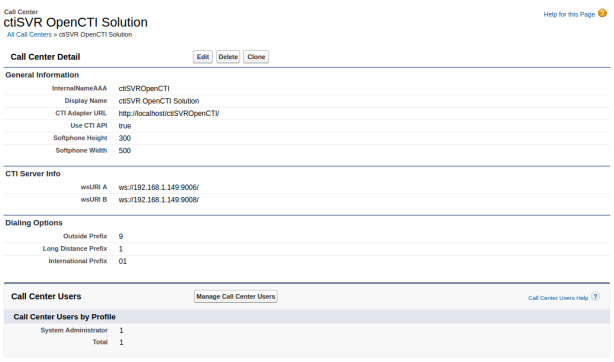
- You can move the ctiSVROpenCTI folder and the files to your WEB server, you need to change the CTI Adapter URL after you have changed the location
CtiSVR Configuration
- Firstly, you need to follow this guide to install and configure CtiSVR
- In order to support “free seating”, we need to use an IP address to map to an agent extension, you can add the mapping of IP address to extension by CtiSVR tcpgate console command, for example
- add ipextnmap 192.168.1.101 2611
- You can display the mapping by the following tcpgate console command, for example
- disp ipextnmap
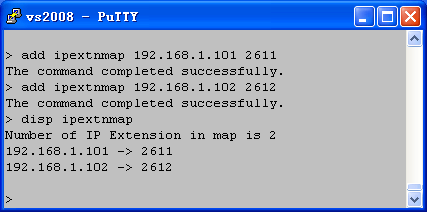
- You also need a WebSocket port for the integration of CtiSVR and Salesforce, to add a WebSocket port, enter the following tcpgate console commands
- add tcp 9006 * * custom ivrsvrws
- You can display all the listening ports of CtiSVR by the following tcpgate console command
- disp tcp all
CtiSVR Salesforce Sample Softphone
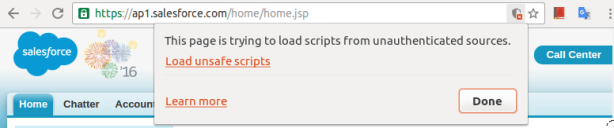
- After Login Salesforce, the browser will prevent loading and execution of unsafe script (the CTI Adapter URL) from unauthorized site , for example

- If you are using Chrome, click the Load Unsafe Script to load the Sample Softphone script.
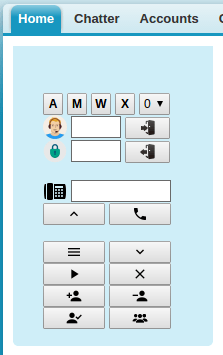
- The Sample Softphone is appeared on the left hand side of the Salesforce
Sample Softphone Programming Details
- The source code of the sample Softphone is on here, most of the code can be found in the index.html file
- When the page is load, it gets the configuration string that contains all details of the call center
// the page is loaded

 window.addEventListener("load", sforce.interaction.cti.getCallCenterSettings(getCallCenterSettingsCallback), false);
- In the getCallCenterSettingsCallback function, the configString is in JSON format. Since the Softphone is connected to CtiSVR using WebSocket, the following is to get the production and backup WebSocket URIs
var jsonObj = JSON.parse(configString);

 wsUriA = jsonObj["/ServerInfo/wsURIA"];

 wsUriB = jsonObj["/ServerInfo/wsURIB"];
- In the getCallCenterSettingsCallback function, we also get the international, long distance and outside dialing prefix by the following
internationalPrefix = jsonObj["/reqDialingOptions/reqInternationalPrefix"];

 longDistPrefix = jsonObj["/reqDialingOptions/reqLongDistPrefix"];

 outsidePrefix = jsonObj["/reqDialingOptions/reqOutsidePrefix"];
- After that, a WebSocket is created to connect to CtiSVR. Also set the callback functions for the WebSocket
webSocket = new WebSocket(wsUriA);

webSocket.onopen = function(evt) {

    onWebSocketOpen(evt)

};

 webSocket.onclose = function(evt) {

    onWebSocketClose(evt)

 };

 webSocket.onmessage = function(evt) {

    onWebSocketMessage(evt)

 };

 webSocket.onerror = function(evt) {

    onWebSocketError(evt)

 };
- When the WebSocket is connected to the CtiSVR, the callback function onWebSocketOpen will be invoked. We then submit a request (myextension) to CtiSVR to query the agent extension based on the IP address of the browser
// Callback of WebSocket onOpen

 function onWebSocketOpen(evt) {

    webSocket.send(JSON.stringify({

        id: MSGID_GETEXTENSION,

        request: "myextension"

    }));

} - If there is reply from CtiSVR, callback function onWebSocketMessage will be invoked. The response message also in JSON format. If the myextension command is successful, the extension number can be found in the response message. We then store the extension number and submit another command (startmonitor) to monitor the agent extension for unsolicited telephony events.
if (id==MSGID_GETEXTENSION) {

    if (jsonObj["result"]=='success') {

        myExtension = jsonObj["extension"];

        webSocket.send(JSON.stringify({

            id: MSGID_STARTMONITOR,

            request: "startmonitor",

            extension: myExtension

        }));

    } else {

        alert('SoftPhone get CTI extension failed.');

    }

 }
- If the startmonitor command is successful, querydeviceinfo command is sent to CtiSVR
} else if (id==MSGID_STARTMONITOR) {

    if (jsonObj["result"]=='success') {

        webSocket.send(JSON.stringify({

            id: MSGID_QUERYDEVICEINFO,

            request: "querydeviceinfo",

            extension: myExtension

        }));

    } else {

        alert('SoftPhone monitor CTI extension failed.');

    }

 }
- We then set the state of the Softphone by the result of querydeviceinfo. Also register Click to Dial callback function and enable Click to Dial with Salesforce.
} else if (id==MSGID_QUERYDEVICEINFO) {

    if (jsonObj["result"]=='success') {

        myAgentId = jsonObj["associateddevice"];

        if (myAgentId) {

            document.getElementById('txtAgentId').value = myAgentId;

            document.getElementById('txtPasswd').value = "*****";

            document.getElementById('btnSubmitLogin').disabled = true;

            document.getElementById('btnSubmitLogout').disabled = false;

            document.getElementById('txtAgentId').disabled = true;

            document.getElementById('txtPasswd').disabled = true;

            webSocket.send(JSON.stringify({

                id: MSGID_QUERYAGENTSTATE,

                request: "queryagentstate",

                extension: myExtension

            }));

        } else {

            document.getElementById('btnSubmitLogin').disabled = false;

            document.getElementById('btnSubmitLogout').disabled = true;

            document.getElementById('txtAgentId').disabled = false;

            document.getElementById('txtPasswd').disabled = false;

            document.getElementById('btnAuto').disabled = true;

            document.getElementById('btnManual').disabled = true;

            document.getElementById('btnAcw').disabled = true;

            document.getElementById('btnAux').disabled = true;

            webSocket.send(JSON.stringify({

                id: MSGID_SNAPSHOT,

                request: "snapshot",

                extension: myExtension

            }));

        }

        // Register Click to Dial Callback

        sforce.interaction.cti.onClickToDial(onClickToDialCallback);

        // Enable Click to Dial

      sforce.interaction.cti.enableClickToDial(enableClickToDialCallback);

    }

 }
- The Softphone is now ready for Click to Dial and ScreenPop. When user clicks a telephone number, callback function onClickToDialCallback is invoked. Before a number is submitted to CtiSVR, we need to format a prefix number and remove all characters such as “+()” and SPACE, then makecall or consultation command is sent to CtiSVR which depends on agent state
var onClickToDialCallback = function (response) {

    if (response.result) {

        var prefix;

        var jsonObj = JSON.parse(response.result);

        var number = jsonObj["number"];

        if (number.indexOf("+")>=0) {

            prefix = outsidePrefix + internationalPrefix;

        } else if (number.indexOf("(")>=0 && number.indexOf(")")>=0) {

            prefix = outsidePrefix + longDistPrefix;

        }

        number = number.replace(/\+/g, '');

        number = number.replace(/\s+/g, '');

        number = number.replace(/\(/g, '');

        number = number.replace(/\)/g, '');

        number = number.replace(/-/g, '');

        if (prefix) {

            number = prefix + number;

        } else {

            if (number.length > myExtension.length) {

                number = outsidePrefix + number;

            }

        }

        if (myAgentIdle==true) {

            // idle, make call

            webSocket.send(JSON.stringify({

                id: MSGID_MAKECALL,

                request: "makecall",

                extension: myExtension,

                destination: number

            }));

        } else {

            // has call, consultation call

            webSocket.send(JSON.stringify({

                id: MSGID_CONSULTATION,

                request: "consultation",

                extension: myExtension,

                destination: number

            }));

        }

    }

 }
- When there is an incoming call, the Softphone receives telephony offer event and Salesforce ScreenPop function is invoked
if (jsonObj["eventtype"]=='offer') {

    // agent is not idle

    myAgentIdle = false;

    // inbound screen pop

    if (jsonObj["origcalling"]) {

        document.getElementById('txtCLI').value = jsonObj["origcalling"];

        document.getElementById('txtDNIS').value = jsonObj["called"];

        sforce.interaction.searchAndScreenPop(jsonObj["origcalling"], '',

            'inbound', searchAndScreenPopCallback);

    } else {

        document.getElementById('txtCLI').value = jsonObj["calling"];

        document.getElementById('txtDNIS').value = jsonObj["called"];

        sforce.interaction.searchAndScreenPop(jsonObj["calling"], '',

            'inbound', searchAndScreenPopCallback);

    }

 }
- When Login button is clicked, jQuery function $(‘#btnSubmitLogin’).click is invoked
$('#btnSubmitLogin').click(function(e) {

    e.preventDefault(); //prevent form from submitting

    myAgentId = $('#loginForm').find('[id=txtAgentId]').val();

    myPasswd = $('#loginForm').find('[id=txtPasswd]').val();

    if (myAgentId) {

        webSocket.send(JSON.stringify({

            id: MSGID_LOGIN,

            request: "login",

            extension: myExtension,

            agentid: myAgentId,

            passwd: myPasswd

        }));

    }

 });
- When Logout button is clicked, jQuery function $(‘#btnSubmitLogout’).click is invoked
$('#btnSubmitLogout').click(function(e) {

    e.preventDefault(); //prevent form from submitting

    if (myAgentId) {

        webSocket.send(JSON.stringify({

            id: MSGID_LOGOUT,

            request: "logout",

            extension: myExtension,

            agentid: myAgentId

        }));

    }

 });
- When AUTO button is clicked, the function changeAUTO is invoked
function changeAUTO() {

    if (myAgentId) {

        webSocket.send(JSON.stringify({

            id: MSGID_CHANGEAUTO,

            request: "setstate",

            extension: myExtension,

            agentid: myAgentId,

            passwd: myPasswd,

            state: "auto"

        }));

    }

 }
- When MANUAL button is clicked, the function changeMANUAL is invoked
function changeMANUAL() {

    if (myAgentId) {

        webSocket.send(JSON.stringify({

            id: MSGID_CHANGEMANUAL,

            request: "setstate",

            extension: myExtension,

            agentid: myAgentId,

            passwd: myPasswd,

            state: "manual"

        }));

    }

 }
- When ACW button is clicked, the function changeACW is invoked
function changeACW() {

    if (myAgentId) {

        webSocket.send(JSON.stringify({

            id: MSGID_CHANGEACW,

            request: "setstate",

            extension: myExtension,

            agentid: myAgentId,

            passwd: myPasswd,

            state: "acw"

        }));

    }

 }
- When AUX button is clicked, the function changeAUX is invoked
function changeAUX() {

    if (myAgentId) {

        var reason = document.getElementById('selReasonCode');

        var code = reason.options[reason.selectedIndex].value;

        webSocket.send(JSON.stringify({

            id: MSGID_CHANGEAUX,

            request: "setstate",

            extension: myExtension,

            agentid: myAgentId,

            passwd: myPasswd,

            state: "aux",

            reasoncode: code

        }));

    }

 }
- When Answer button is clicked, jQuery function $(‘#btnSubmitAnswer’).click is invoked
$('#btnSubmitAnswer').click(function(e) {

    e.preventDefault(); //prevent form from submitting

    webSocket.send(JSON.stringify({

        id: MSGID_ANSWER,

        request: "answer",

        extension: myExtension

    }));

 });
- When Call button is clicked, jQuery function $(‘#btnSubmitCall’).click is invoked
$('#btnSubmitCall').click(function(e) {

    e.preventDefault(); //prevent form from submitting

    var phoneNumber =

        $('#phoneNumberForm').find('[id=txtPhoneNumber]').val();

    if (phoneNumber) {

        webSocket.send(JSON.stringify({

            id: MSGID_MAKECALL,

            request: "makecall",

            extension: myExtension,

            destination: phoneNumber

        }));

    }

 });
- When Hold button is clicked, the function pressHold is invoked
function pressHold() {

    webSocket.send(JSON.stringify({

        id: MSGID_HOLD,

        request: "hold",

        extension: myExtension

    }));

 }
- When Retrieve button is clicked, the function pressRetrieve is invoked
function pressRetrieve() {

    webSocket.send(JSON.stringify({

        id: MSGID_RETRIEVE,

        request: "retrieve",

        extension: myExtension

    }));

 }
- When Hangup button is clicked, the function pressHangup is invoked
function pressHangup() {

    webSocket.send(JSON.stringify({

        id: MSGID_HANGUP,

        request: "hangup",

        extension: myExtension

    }));

 }
- When DropParty button is clicked, the function pressDrop is invoked
function pressDrop() {

    var phoneNumber =

        $('#phoneNumberForm').find('[id=txtPhoneNumber]').val();

    if (phoneNumber) {

        webSocket.send(JSON.stringify({

            id: MSGID_DROPPARTY,

            request: "dropparty",

            extension: myExtension,

            party: phoneNumber

        }));

    }

 }
- When Consultation button is clicked, the function pressConsultation is invoked
function pressConsultation() {

    var phoneNumber =

        $('#phoneNumberForm').find('[id=txtPhoneNumber]').val();

    if (phoneNumber) {

        webSocket.send(JSON.stringify({

            id: MSGID_CONSULTATION,

            request: "consultation",

            extension: myExtension,

            destination: phoneNumber

       }));

    }

 }
- When Reconnect button is clicked, the function is pressReconnect invoked
function pressReconnect() {

    webSocket.send(JSON.stringify({

        id: MSGID_RECONNECT,

        request: "reconnect",

        extension: myExtension

    }));

 }
- When Transfer button is clicked, the function pressTransfer is invoked
function pressTransfer() {

    var phoneNumber =

        $('#phoneNumberForm').find('[id=txtPhoneNumber]').val();

    webSocket.send(JSON.stringify({

        id: MSGID_TRANSFER,

        request: "transfer",

        extension: myExtension,

        destination: phoneNumber

    }));

 }
- When Conference button is clicked, the function pressConference is invoked
function pressConference() {

    var phoneNumber =

        $('#phoneNumberForm').find('[id=txtPhoneNumber]').val();

    webSocket.send(JSON.stringify({

        id: MSGID_CONFERENCE,

        request: "conference",

        extension: myExtension,

        destination: phoneNumber

    }));

 }
Some CTI tools such as CtiSVR, AstLogger and ScreenPop use uuiSVR for data passing during call control. The data read write procedures are changed to support user data in XML format and some tools are updated for this reason. Please find the details below
CtiSVR Version 1.2.3
1. The user data is encoded in base64 format before storing in uuiSVR. Also the data is decoded before sending to related applications.
2. calltoui is modified to support call with user data.
AstLogger 1.4.9
1. Supports agent triggered trunk recording.
2. Fixed a bug in the WebSocket interface, the closing of websocket will crash the application.
3. The user data is encoded in base64 format before storing in uuiSVR. Also the data is decoded before sending to related applications.
ScreenPop Version 1.4.5
1. The user data is encoded in base64 format before storing in uuiSVR. Also the data is decoded before sending to related applications.
 CloudCDR supports Cisco now. I just completed the implementation of CloudCDR to support Cisco CDR. If you are interested to have a trial, please download the latest Windows version here. Cisco CDR data is a comma separated string, it is quite easy to parse it and send the data to database and Splunk. You are not required to type “add paramcdr” command one by one because I have prepared the command “import paramcdr cisco” for you. To configure the tool works with Cisco, please set the following parameters in the tcpgate program console:
If you don’t have cdr_systemtype and cdr_systemothers parameter, please do the following
> add parameter cdr_systemtype others
> add parameter cdr_systemothers cisco
> import paramcdr cisco
> reload
If you have the cdr_systemtype and cdr_systemothers parameter, please do the following
> update parameter cdr_systemtype others
> update parameter cdr_systemothers cisco
> import paramcdr cisco
> reload
Reference to the Cisco CDR architecture, you need to configure Cisco CDR Repository Manager to send the CDR files to CloudCDR via ftp/sftp. Then CloudCDR imports the CDR files from the local ftp/sftp directory. To configure the importing of CDR files from local directory, enter the following command from the tcpgate console.
> add importdir c:\\ciscocdr\\ c:\\ciscocdr\\archive\\
> add retentiondir c:\\ciscocdr\\archive\\ 90 90-days-retention
The package file contains a MySQL script which is used to create the tCiscoCDR table. Please contact me to get a trial license key.
22 Jul 2016, AvayaECHI 1.1.8 just released. This version
1. Fixed a bug in the uploadsftp module that uploaded files are corrupted.
21 July 2016, screenPop 1.4.4 just released. This version
1. Fixed a bug in the WebSocket interface, the closing of websocket will crash the application.
2. Supports DropParty() function.
19 Jul 2016, bcmsSVR 1.1.12 just released. It supports the following new reports
1. list measurements hunt-group last-hour
2. list measurements hunt-group yesterday-peak
3. list measurements hunt-group today-peak
 UPINGET
