AutoBridge 1.3.0 Released

Posted: February 10, 2025 in News, TSAPI

AutoBridge 1.3.0 just released, this version has the following updates:

1. Integration with ctiSVR for DMCC support. A parameter called ab_ctisvr is introduced.
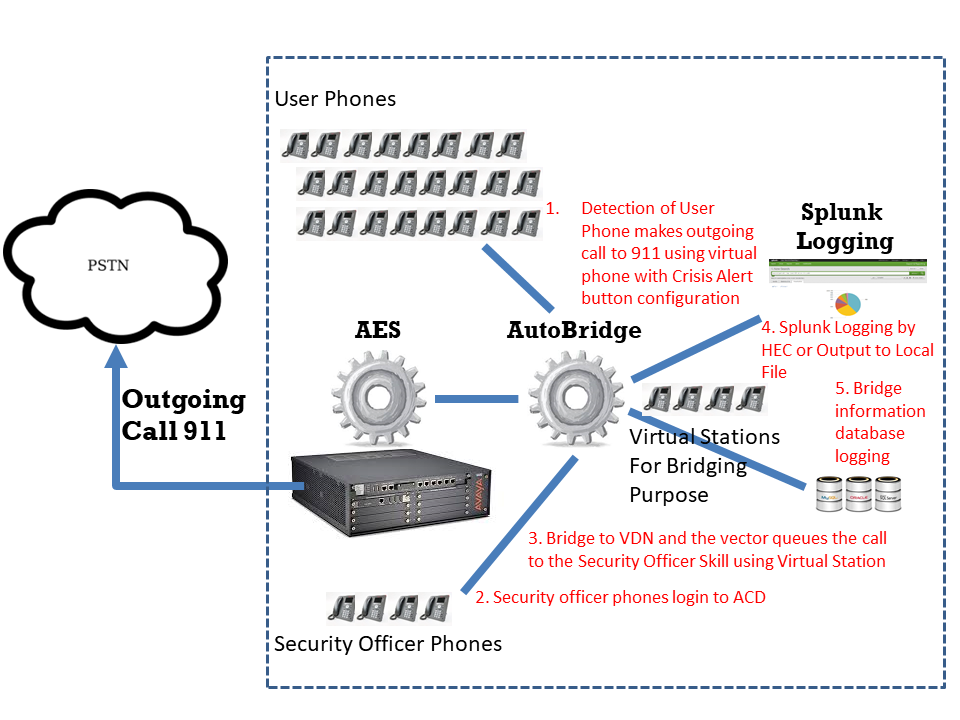
2. Supports auto bridge call for Crisis Alert extension. Parameters ab_crisisalertdevice, ab_crisisalertbridgedestination and ab_crisisalertbridgebackup are introduced.
3. Crisis alert events are sent to Splunk for centralized logging.
4. Crisis alert bridging is supported only when phantom device is available.
5. Fine tune the object deletion sequence for program exit.
6. Add database logging for crisis alert bridging.
7. Add email notification for Crisis Alert calls. The parameter ab_crisisalertemailnotify is added.

AvayaCDR 1.7.1 Released

Posted: February 9, 2025 in Avaya CDR, News

AvayaCDR 1.7.1 just released, this version has the following updates.

1. Add cs1k3l (Avaya CS1000 with NEW format and 3 lines records) formats.
2. Add data buffer connector in case the PBX side required the client side to connect to the buffer connector to get the CDR data via TCP socket.
3. Fine tune the objection deletion sequence for program termination.
4. Add tcpgate command feedsql.

ctiSVR 1.4.1 Released

Posted: February 9, 2025 in News, TSAPI

ctiSVR 1.4.1 just released, this version has the following updates:

1. Add “setup” and “setup api” commands for program configuration.
2. Add API aya (Are you alive) to check the server status.
3. Compile with lastest version of CSchedulerEx for better handling of start stop internal scheduler.
4. Fine tune the object deletion sequence for program exit.
5. The API listextension add a parameter details=full for display more parameters.
6. Encode the password to XML format before sending to DMCC login.

clintSVR 2.2.2 Released

Posted: February 8, 2025 in CMS, News

clintSVR 2.2.2 just released, this version has the following updates.

1. Add extra AUX string to the API upqueueagentstatus and splitskillsla.
2. Fine tune the scheduler class to stop the service more effectively.
3. Fine tune the objection deletion sequence to stop the service more effectively.
4. Add field agentname to the custom report uphisallspagsummary. Search the result by agents or skills.
5. Supports postgresql database.
6. Supports oracle database for the historical and UPINGET reports.

bcmsSVR 2.3.1 Released

Posted: February 8, 2025 in BCMS, News

bcmsSVR 2.3.1 just released, this version has the following updates.

1. Add dynamic fields agentsAUX10-99 to the bcmsmonitorsplitsla and bcmsmonitorsplitstatus.
2. Fixed report deletion bug due to deadlock happened to access the bcms mutex for the deleting of the report threads.
3. Add new command disp connectionpool to display the OSSI connection pool status.
4. Only check OSSI connection status when the maximum IDLE time is exceeded.
5. Add “list emergency” REST API.
6. Supports postgresql database.

AutoBridge Supports Database Logging

Posted: December 22, 2024 in News

AutoBridge now supports the bridging information logging to database. The database table has the fields in the following table. After the integration, you can easily search Crisis Alert logging in the Splunk or in the database. If you want a trial, please contact us.

Specific parameters for database logging are explained in more details as follows:

ab_dbdsn: The ODBC DSN for the database connection
ab_dbusername: The username to connect to the database
ab_dbpasswd: The password to connect to the database
ab_dbtable: The table name for AutoBridge logging. By default, it is called tBridgeLog
ab_dberrfile: The error file to store the log if the database if found connection error
ab_dbtest: true or false to turn on database connection testing.

AvayaMonitor Supports CM OSSI Integration

Posted: December 20, 2024 in News, TSAPI

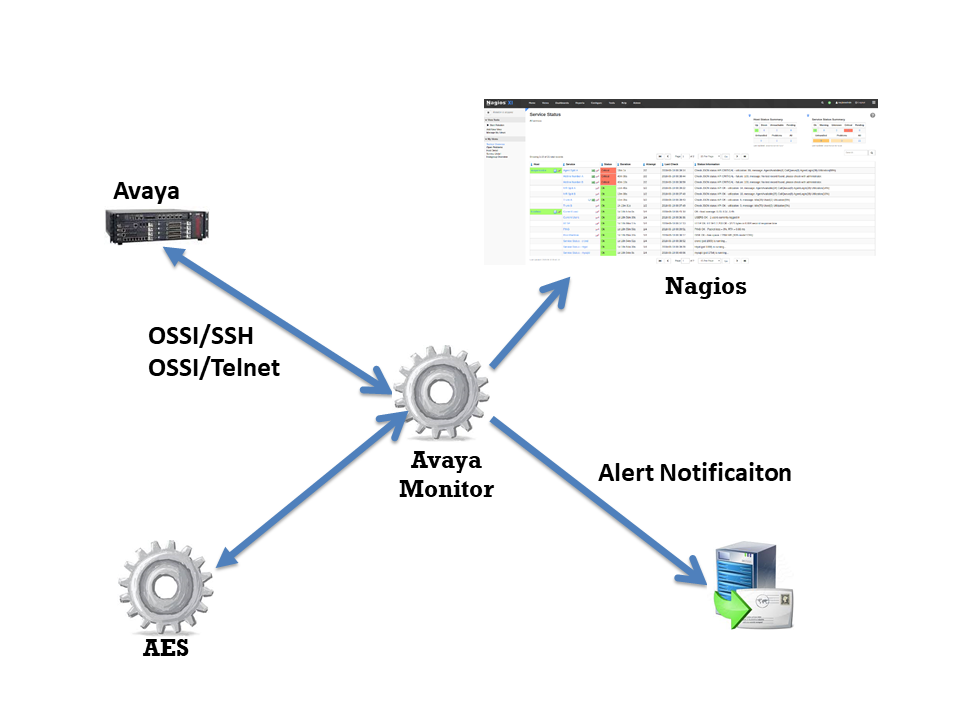
The AvayaMonitor has enhanced to support integration with Avaya CM using the OSSI interface. Currently, the following CM objects can be monitored by AvayaMonitor. Also, the dashboard can be easily created using Nagios Monitoring tool. If you want to have a trial, please contact us.

  • CM AE Svcs CTI Link
  • CM Processor Channels

bcmsSVR Reports with AUX Reason Codes

Posted: December 7, 2024 in BCMS, TSAPI

bcmsSVR can integrate with ctiSVR now to get AUX reason codes for two real-time reports. This makes the two real-time reports have similar look and feel as CMS reports. The JSON format of the two reports are illustrated as follows. We can use Grafana to query the two reports and produce useful and beautiful dashboards. You can reference this for using Grafana to monitor call center.

1. monitor bcms split status (real-time)

{
  "msgtype": "response",
  "id": "",
  "result": "success",
  "report": "bcmsmonitorsplitstatus",
  "acd": 5,
  "timestamp": 1733519669,
  "list": [
    {
      "split": "123",
      "splitName": "ABC",
      "callsWaiting": 0,
      "oldestCallWaiting": 0,
      "acceptableServiceLevel": 20,
      "percentWithinServiceLevel": -1,
      "agentsStaffed": 1,
      "agentsAvailable": 0,
      "agentsACD": 0,
      "agentsACW": 0,
      "agentsAUX": 1,
      "agentsAUX0": 0,
      "agentsAUX1": 0,
      "agentsAUX2": 0,
      "agentsAUX3": 1,
      "agentsAUX4": 0,
      "agentsAUX5": 0,
      "agentsAUX6": 0,
      "agentsAUX7": 0,
      "agentsAUX8": 0,
      "agentsAUX9": 0,
      "agentsExtnCalls": 0,
      "agentsOthers": 0,
      "avgSpeedAns": 0,
      "abandonCalls": 0,
      "avgTimeAbandon": 0,
      "acdCalls": 0,
      "avgTimeTalk": 0,
      "avgAfterCall": -1,
      "agent": [
        {
          "agentName": "YP",
          "agentID": "19900",
          "extension": "10001",
          "state": "AUX",
          "reasoncode": "3",
          "time": "5:14",
          "duration": 29,
          "acdCalls": 0,
          "extInCalls": 0,
          "extOutCalls": 0
        }
      ]
    }
  ]
}

2. monitor bcms split sla (real-time with day summary)

{
  "msgtype": "response",
  "id": "",
  "result": "success",
  "report": "bcmsmonitorsplitsla",
  "acd": 5,
  "timestamp": 1733519846,
  "split": "123",
  "serviceName": "ABC",
  "callsWaiting": 0,
  "oldestCallWaiting": 0,
  "displayOldestCallWaiting": "00:00",
  "agentsStaffed": 1,
  "agentsAvailable": 0,
  "agentsACD": 0,
  "agentsACW": 0,
  "agentsAUX": 1,
  "agentsAUX0": 0,
  "agentsAUX1": 0,
  "agentsAUX2": 0,
  "agentsAUX3": 1,
  "agentsAUX4": 0,
  "agentsAUX5": 0,
  "agentsAUX6": 0,
  "agentsAUX7": 0,
  "agentsAUX8": 0,
  "agentsAUX9": 0,
  "agentsExtnCalls": 0,
  "agentsOthers": 0,
  "acdCalls": 0,
  "abandonCalls": 0,
  "avgSpeedAns": 0,
  "displayAvgSpeedAns": "00:00",
  "avgTimeAbandon": 0,
  "displayAvgTimeAbandon": "00:00",
  "avgTimeTalk": 0,
  "displayAvgTimeTalk": "00:00",
  "totalTimeAfterCall": 0,
  "displayTotalTimeAfterCal": "00:00",
  "percentWithinServiceLevel": -1,
  "acdCallsDay": 0,
  "abandonCallsDay": 0,
  "avgSpeedAnsDay": 0,
  "displayAvgSpeedAnsDay": "00:00",
  "avgTimeAbandonDay": 0,
  "displayAvgTimeAbandonDay": "00:00",
  "avgTimeTalkDay": 0,
  "displayAvgTimeTalkDay": "00:00",
  "totalTimeAfterCallDay": 18000,
  "displayTotalTimeAfterCallDay": "300:00",
  "percentWithinServiceLevelDay": -1,
  "flowIn": 0,
  "flowOut": 0,
  "totalTimeAuxOther": 0,
  "displayTotalTimeAuxOther": "00:00",
  "avgStaff": 1,
  "agent": [
    {
      "agentName": "YP",
      "agentID": "19900",
      "extension": "10001",
      "state": "AUX",
      "reasoncode": "3",
      "time": "5:14",
      "duration": 206,
      "acdCalls": 0,
      "extInCalls": 0,
      "extOutCalls": 0,
      "acdCallsDay": 0,
      "avgTalkTimeDay": 0,
      "totalACWDay": 18000,
      "totalAvailableTimeDay": 0,
      "totalAuxOthersDay": 0,
      "extnCallsDay": 0,
      "avgExtnTimeDay": 0,
      "totalTimeStaffedDay": 18000,
      "totalHoldTimeDay": 0
    }
  ]
}

Introduction

The Avaya Call Center Auto Greeting Server manages call center greetings centrally. It uses Avaya TSAPI and DMCC library to barges in to an agent extension and plays a greeting when there is incoming call of the extension. Multiple greetings can be defined for an agent. For example, different greetings for service, sales and support calls or different greetings based on languages. Also, the server supports streaming of WAV file. Call center function such as T&C playing with customer during sales activities is supported.

The AutoGreeting server can stream WAV file by itself using RTP streaming. If you want to offload the playing of the greeting file by another server, you can setup and configure an Asterisk server. This  required setup of a SIP trunk between your Avaya CM and the Asterisk and prefix codes are required for call routing from CM to the Asterisk.

Before installation of the software, please make sure you have the following Avaya features and licenses are installed:

  • Avaya AES Basic Licenses
  • Avaya DMCC Licenses

Installation  

  • Download and install the TSAPI client for Windows 32-bit / TSAPI client for Windows 64-bit from Avaya web site, it contains the library files.
  • Contact us for the the Avaya Call Center Auto Greeting Server package file.
  • Follow the installation steps below to install the software.
    • Extract all the files into directory c:\program files\autogreeting
    • Open Windows Command Prompt as Administrator, enter the following commands to register the program as Windows Service
      • cd c:\program files\autogreeting
      • autogreeting -i
      • sc description autogreeting “Provides Auto Greeting functions for Avaya CM”
    • Open ODBC Setting, create a System DSN called AUTOGREETINGCFG for Microsoft Access Driver and point to autogreeting.mdb which is located in the directory c:\program files\autogreeting
    • Start the Windows Service autogreeting
    • Telnet to localhost and port number 14002, enter username tcpgate and password tcpgate01 to access the program console
    • Enter the following command to have the basic setup and restart the service
      • setup
    • Enter the following command in the program console to add extensions
      • add extension 61101
      • Hint: 61101 is agent extension
    • Enter the following command in the program console to add ACD monitoring
      • add acd 51101
      • Hint: 51101 is ACD
    • Enter the following command in the program console to add phantom device
      • add phantom 41101 true/false encrypted_passwd
      • Hint: 41101 is phantom device
      • Hint: true/false is for login DMCC
      • Hint: Encrypted password for registration of DMCC extension
    • Enter the following command in the program console to define agents for autogreeting
      • add agent 50001
      • Hint: 50001 is agent ID
      • All agents are in scope for autogreeting by default. Add your specific agents if you want these agents for auto greeting
    • Enter the following command in the program console for VDN or split number to greeting file folder mapping
      • add greetingpath 10001 c:\\greeting\\programA\\
      • Hint: 10001 is VDN or split number, the path c:\\greeting\\programA\\ contains the voice greeting files which is WAV, mono and 8000 Hz format
    • Enter the following command in the program console for wavnumber to file path mapping
      • add wavnumberpath 00001 c:\\voice\\tc00001.wav
    • Enter the following command in the program console to add prefix mapping for VDN or split number (only required when Asterisk is for greeting purpose)
      • add greetingprefix 10001 451
      • Hint: 10001 is VDN or split number, 451 is dialing prefix and together with agent ID to form the final called number (Asterisk extension), you need to create such called number in Asterisk
    • Enter the following command in the program console for debug messages
      • trace on asc
    • Enter the following command in the program console for help menu
      • help

API for Streaming of Wav File

Asterisk Configuration (Required only without DMCC license)

  • Edit the extension_custom.conf, add the dialplan below for auto greeting
  • autogreeting
  • Create the greeting extension in Asterisk and record the unavailable message, the autogreeting server uses the unavailable  message as the greeting for agent
  • Use Asterisk’s advanced mailbox function to record the unavailable message, agent can change his/her greeting easily

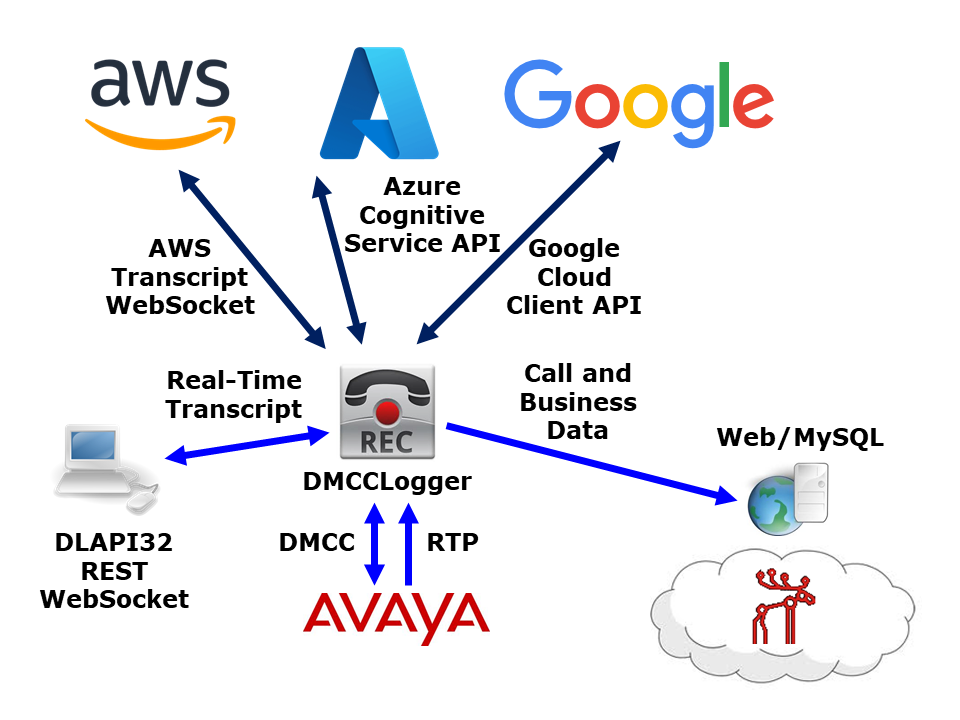
DMCCLogger now supports real-time speech to text transcription. After continuous development, Google is now supported. The integration is implemented directly using the RTP packets captured from the DMCC, therefore transcription process is close to real-time. The transcription text is sent to application by WebSocket or API interface in the format of JSON event.

We will support more vendors in the future. If you want a trial, please contact us by email.