clintSVR 2.2.3 Released

Posted: April 15, 2025 in CMS, News

clintSVR 2.2.3 just released, this version has the following updates.

1. Supports new custom report uprtallvdnreport.
2. Supports uprtallvdnreport REST, Splunk and Database logging.
3. Supports uprtallspskreport Splunk logging.
4. Supports uprtallvdnreport and uprtallspskreport metrics REST API which is for Grafana integration.
5. Custom report license key is required for UPINGET custom reports.
6. Apply locking for database writing and checking to prevent database disconnection when the two are executed in parallel.
7. Supports uphisallvdnreport REST and Database logging.
8. Supports vdnsla REST and Database logging.

AutoBridge 1.3.1 Released

Posted: February 28, 2025 in News, TSAPI

AutoBridge 1.3.1 just released, this version has the following updates:

1. When the calling device is registered in the crisis alert map and a call with new call id is informed, the old registration is removed and activate the bridging again.
2. A scheduler procedure is added to check the crisis alert map and cleanup the mapping after the call is finished.
3. Crisis alert cancel event (by crisis-alert button auto pressing) and list emergency notification will be returned immediately.
4. If a new call’s state is in initiated, alerting and connected state, bridging can be started. Before that, only connected call will trigger the bridging. This maybe related to timing issue because the call can be notified before the call is connected.
5. OSSI interface can be integrated and the list emergency API can be used to trigger the bridging for specific tenant stations. New parameters ab_ossi and ab_cmtenant are introduced.
6. A new parameter called ab_crisisalertcancelbutton and ab_crisisalertcancelbuttonautopresss are introduced to press the crisis-alert button once bridging is started. This action is to cancel the crisis-alert.
7. No action to agent extension when the agent extension is not in bridging mode after receiving CONNECTION_CLEARED event.

AutoBridge 1.3.0 Released

Posted: February 10, 2025 in News, TSAPI

AutoBridge 1.3.0 just released, this version has the following updates:

1. Integration with ctiSVR for DMCC support. A parameter called ab_ctisvr is introduced.
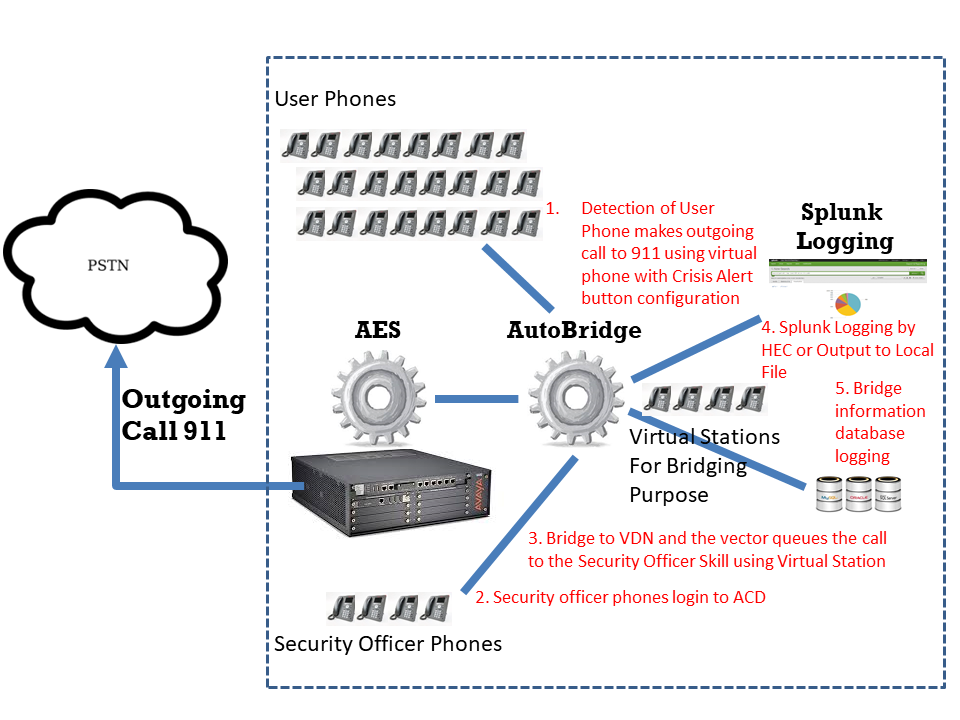
2. Supports auto bridge call for Crisis Alert extension. Parameters ab_crisisalertdevice, ab_crisisalertbridgedestination and ab_crisisalertbridgebackup are introduced.
3. Crisis alert events are sent to Splunk for centralized logging.
4. Crisis alert bridging is supported only when phantom device is available.
5. Fine tune the object deletion sequence for program exit.
6. Add database logging for crisis alert bridging.
7. Add email notification for Crisis Alert calls. The parameter ab_crisisalertemailnotify is added.

AvayaCDR 1.7.1 Released

Posted: February 9, 2025 in Avaya CDR, News

AvayaCDR 1.7.1 just released, this version has the following updates.

1. Add cs1k3l (Avaya CS1000 with NEW format and 3 lines records) formats.
2. Add data buffer connector in case the PBX side required the client side to connect to the buffer connector to get the CDR data via TCP socket.
3. Fine tune the objection deletion sequence for program termination.
4. Add tcpgate command feedsql.

ctiSVR 1.4.1 Released

Posted: February 9, 2025 in News, TSAPI

ctiSVR 1.4.1 just released, this version has the following updates:

1. Add “setup” and “setup api” commands for program configuration.
2. Add API aya (Are you alive) to check the server status.
3. Compile with lastest version of CSchedulerEx for better handling of start stop internal scheduler.
4. Fine tune the object deletion sequence for program exit.
5. The API listextension add a parameter details=full for display more parameters.
6. Encode the password to XML format before sending to DMCC login.

clintSVR 2.2.2 Released

Posted: February 8, 2025 in CMS, News

clintSVR 2.2.2 just released, this version has the following updates.

1. Add extra AUX string to the API upqueueagentstatus and splitskillsla.
2. Fine tune the scheduler class to stop the service more effectively.
3. Fine tune the objection deletion sequence to stop the service more effectively.
4. Add field agentname to the custom report uphisallspagsummary. Search the result by agents or skills.
5. Supports postgresql database.
6. Supports oracle database for the historical and UPINGET reports.

bcmsSVR 2.3.1 Released

Posted: February 8, 2025 in BCMS, News

bcmsSVR 2.3.1 just released, this version has the following updates.

1. Add dynamic fields agentsAUX10-99 to the bcmsmonitorsplitsla and bcmsmonitorsplitstatus.
2. Fixed report deletion bug due to deadlock happened to access the bcms mutex for the deleting of the report threads.
3. Add new command disp connectionpool to display the OSSI connection pool status.
4. Only check OSSI connection status when the maximum IDLE time is exceeded.
5. Add “list emergency” REST API.
6. Supports postgresql database.

AutoBridge Supports Database Logging

Posted: December 22, 2024 in News

AutoBridge now supports the bridging information logging to database. The database table has the fields in the following table. After the integration, you can easily search Crisis Alert logging in the Splunk or in the database. If you want a trial, please contact us.

Specific parameters for database logging are explained in more details as follows:

ab_dbdsn: The ODBC DSN for the database connection
ab_dbusername: The username to connect to the database
ab_dbpasswd: The password to connect to the database
ab_dbtable: The table name for AutoBridge logging. By default, it is called tBridgeLog
ab_dberrfile: The error file to store the log if the database if found connection error
ab_dbtest: true or false to turn on database connection testing.

AvayaMonitor Supports CM OSSI Integration

Posted: December 20, 2024 in News, TSAPI

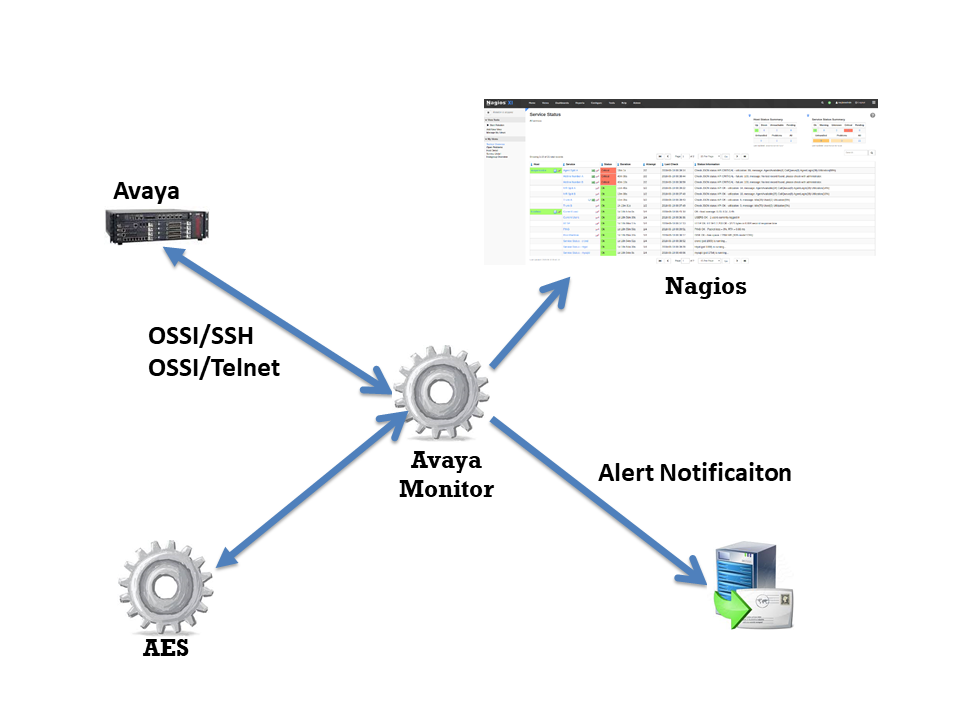
The AvayaMonitor has enhanced to support integration with Avaya CM using the OSSI interface. Currently, the following CM objects can be monitored by AvayaMonitor. Also, the dashboard can be easily created using Nagios Monitoring tool. If you want to have a trial, please contact us.

  • CM AE Svcs CTI Link
  • CM Processor Channels

bcmsSVR Reports with AUX Reason Codes

Posted: December 7, 2024 in BCMS, TSAPI

bcmsSVR can integrate with ctiSVR now to get AUX reason codes for two real-time reports. This makes the two real-time reports have similar look and feel as CMS reports. The JSON format of the two reports are illustrated as follows. We can use Grafana to query the two reports and produce useful and beautiful dashboards. You can reference this for using Grafana to monitor call center.

1. monitor bcms split status (real-time)

{
  "msgtype": "response",
  "id": "",
  "result": "success",
  "report": "bcmsmonitorsplitstatus",
  "acd": 5,
  "timestamp": 1733519669,
  "list": [
    {
      "split": "123",
      "splitName": "ABC",
      "callsWaiting": 0,
      "oldestCallWaiting": 0,
      "acceptableServiceLevel": 20,
      "percentWithinServiceLevel": -1,
      "agentsStaffed": 1,
      "agentsAvailable": 0,
      "agentsACD": 0,
      "agentsACW": 0,
      "agentsAUX": 1,
      "agentsAUX0": 0,
      "agentsAUX1": 0,
      "agentsAUX2": 0,
      "agentsAUX3": 1,
      "agentsAUX4": 0,
      "agentsAUX5": 0,
      "agentsAUX6": 0,
      "agentsAUX7": 0,
      "agentsAUX8": 0,
      "agentsAUX9": 0,
      "agentsExtnCalls": 0,
      "agentsOthers": 0,
      "avgSpeedAns": 0,
      "abandonCalls": 0,
      "avgTimeAbandon": 0,
      "acdCalls": 0,
      "avgTimeTalk": 0,
      "avgAfterCall": -1,
      "agent": [
        {
          "agentName": "YP",
          "agentID": "19900",
          "extension": "10001",
          "state": "AUX",
          "reasoncode": "3",
          "time": "5:14",
          "duration": 29,
          "acdCalls": 0,
          "extInCalls": 0,
          "extOutCalls": 0
        }
      ]
    }
  ]
}

2. monitor bcms split sla (real-time with day summary)

{
  "msgtype": "response",
  "id": "",
  "result": "success",
  "report": "bcmsmonitorsplitsla",
  "acd": 5,
  "timestamp": 1733519846,
  "split": "123",
  "serviceName": "ABC",
  "callsWaiting": 0,
  "oldestCallWaiting": 0,
  "displayOldestCallWaiting": "00:00",
  "agentsStaffed": 1,
  "agentsAvailable": 0,
  "agentsACD": 0,
  "agentsACW": 0,
  "agentsAUX": 1,
  "agentsAUX0": 0,
  "agentsAUX1": 0,
  "agentsAUX2": 0,
  "agentsAUX3": 1,
  "agentsAUX4": 0,
  "agentsAUX5": 0,
  "agentsAUX6": 0,
  "agentsAUX7": 0,
  "agentsAUX8": 0,
  "agentsAUX9": 0,
  "agentsExtnCalls": 0,
  "agentsOthers": 0,
  "acdCalls": 0,
  "abandonCalls": 0,
  "avgSpeedAns": 0,
  "displayAvgSpeedAns": "00:00",
  "avgTimeAbandon": 0,
  "displayAvgTimeAbandon": "00:00",
  "avgTimeTalk": 0,
  "displayAvgTimeTalk": "00:00",
  "totalTimeAfterCall": 0,
  "displayTotalTimeAfterCal": "00:00",
  "percentWithinServiceLevel": -1,
  "acdCallsDay": 0,
  "abandonCallsDay": 0,
  "avgSpeedAnsDay": 0,
  "displayAvgSpeedAnsDay": "00:00",
  "avgTimeAbandonDay": 0,
  "displayAvgTimeAbandonDay": "00:00",
  "avgTimeTalkDay": 0,
  "displayAvgTimeTalkDay": "00:00",
  "totalTimeAfterCallDay": 18000,
  "displayTotalTimeAfterCallDay": "300:00",
  "percentWithinServiceLevelDay": -1,
  "flowIn": 0,
  "flowOut": 0,
  "totalTimeAuxOther": 0,
  "displayTotalTimeAuxOther": "00:00",
  "avgStaff": 1,
  "agent": [
    {
      "agentName": "YP",
      "agentID": "19900",
      "extension": "10001",
      "state": "AUX",
      "reasoncode": "3",
      "time": "5:14",
      "duration": 206,
      "acdCalls": 0,
      "extInCalls": 0,
      "extOutCalls": 0,
      "acdCallsDay": 0,
      "avgTalkTimeDay": 0,
      "totalACWDay": 18000,
      "totalAvailableTimeDay": 0,
      "totalAuxOthersDay": 0,
      "extnCallsDay": 0,
      "avgExtnTimeDay": 0,
      "totalTimeStaffedDay": 18000,
      "totalHoldTimeDay": 0
    }
  ]
}