Archive for the ‘Asterisk’ Category

Introduction

The Avaya Call Center Auto Greeting Server manages call center greetings centrally. It uses Avaya TSAPI and DMCC library to barges in to an agent extension and plays a greeting when there is incoming call of the extension. Multiple greetings can be defined for an agent. For example, different greetings for service, sales and support calls or different greetings based on languages. Also, the server supports streaming of WAV file. Call center function such as T&C playing with customer during sales activities is supported.

The AutoGreeting server can stream WAV file by itself using RTP streaming. If you want to offload the playing of the greeting file by another server, you can setup and configure an Asterisk server. This  required setup of a SIP trunk between your Avaya CM and the Asterisk and prefix codes are required for call routing from CM to the Asterisk.

Before installation of the software, please make sure you have the following Avaya features and licenses are installed:

  • Avaya AES Basic Licenses
  • Avaya DMCC Licenses

Installation  

  • Download and install the TSAPI client for Windows 32-bit / TSAPI client for Windows 64-bit from Avaya web site, it contains the library files.
  • Contact us for the the Avaya Call Center Auto Greeting Server package file.
  • Follow the installation steps below to install the software.
    • Extract all the files into directory c:\program files\autogreeting
    • Open Windows Command Prompt as Administrator, enter the following commands to register the program as Windows Service
      • cd c:\program files\autogreeting
      • autogreeting -i
      • sc description autogreeting “Provides Auto Greeting functions for Avaya CM”
    • Open ODBC Setting, create a System DSN called AUTOGREETINGCFG for Microsoft Access Driver and point to autogreeting.mdb which is located in the directory c:\program files\autogreeting
    • Start the Windows Service autogreeting
    • Telnet to localhost and port number 14002, enter username tcpgate and password tcpgate01 to access the program console
    • Enter the following command to have the basic setup and restart the service
      • setup
    • Enter the following command in the program console to add extensions
      • add extension 61101
      • Hint: 61101 is agent extension
    • Enter the following command in the program console to add ACD monitoring
      • add acd 51101
      • Hint: 51101 is ACD
    • Enter the following command in the program console to add phantom device
      • add phantom 41101 true/false encrypted_passwd
      • Hint: 41101 is phantom device
      • Hint: true/false is for login DMCC
      • Hint: Encrypted password for registration of DMCC extension
    • Enter the following command in the program console to define agents for autogreeting
      • add agent 50001
      • Hint: 50001 is agent ID
      • All agents are in scope for autogreeting by default. Add your specific agents if you want these agents for auto greeting
    • Enter the following command in the program console for VDN or split number to greeting file folder mapping
      • add greetingpath 10001 c:\\greeting\\programA\\
      • Hint: 10001 is VDN or split number, the path c:\\greeting\\programA\\ contains the voice greeting files which is WAV, mono and 8000 Hz format
    • Enter the following command in the program console for wavnumber to file path mapping
      • add wavnumberpath 00001 c:\\voice\\tc00001.wav
    • Enter the following command in the program console to add prefix mapping for VDN or split number (only required when Asterisk is for greeting purpose)
      • add greetingprefix 10001 451
      • Hint: 10001 is VDN or split number, 451 is dialing prefix and together with agent ID to form the final called number (Asterisk extension), you need to create such called number in Asterisk
    • Enter the following command in the program console for debug messages
      • trace on asc
    • Enter the following command in the program console for help menu
      • help

API for Streaming of Wav File

Asterisk Configuration (Required only without DMCC license)

  • Edit the extension_custom.conf, add the dialplan below for auto greeting

  • autogreeting
  • Create the greeting extension in Asterisk and record the unavailable message, the autogreeting server uses the unavailable  message as the greeting for agent
  • Use Asterisk’s advanced mailbox function to record the unavailable message, agent can change his/her greeting easily

Asterisk FAX Manager

Posted: January 5, 2024 in Asterisk

Asterisk FAX Manager

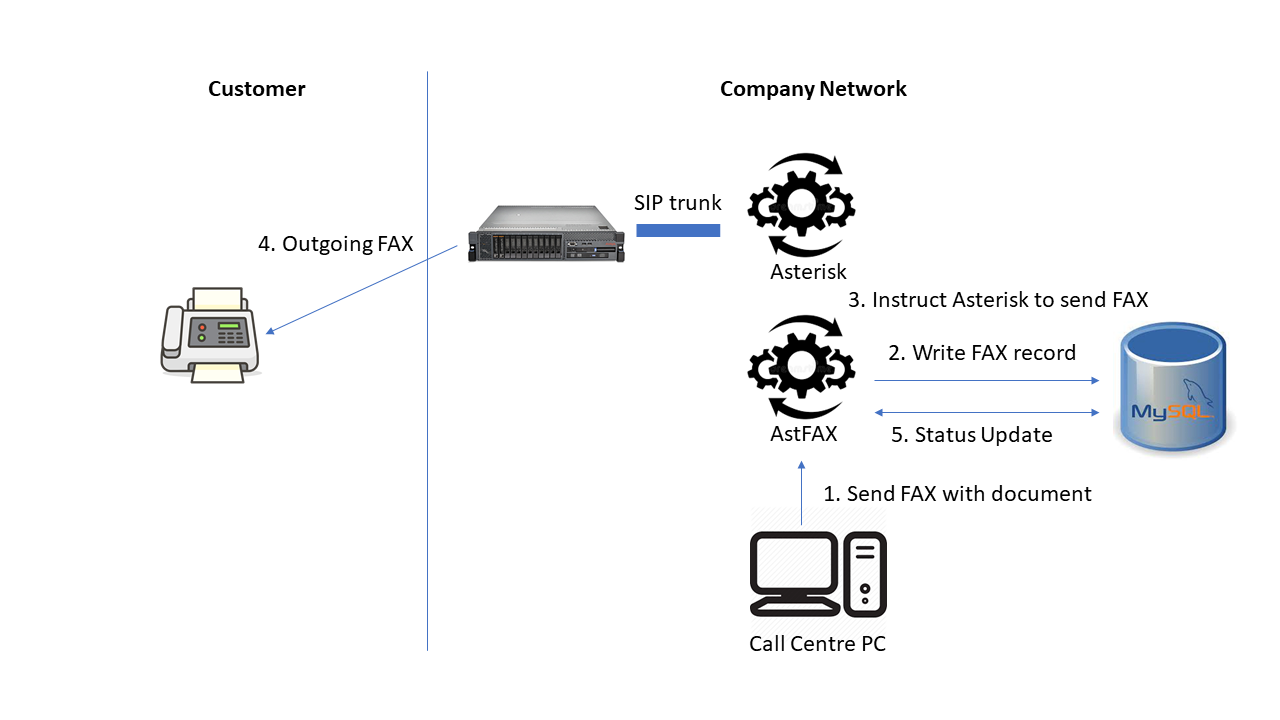
After the integration of Asterisk with Avaya, it is possible to send outgoing FAX by the integration (Avaya MedPro). However, the procedure to send outgoing FAX is quite complicated because you need to upload the document to Asterisk, convert the document to TIFF and create a call file for Asterisk before sending the FAX. The Asterisk FAX Manager (AstFaxMgr) program is developed and can be installed on the Asterisk server to simplify the whole process. RESTFul API is developed so that the agent PC or application server can initiate the FAX sending by using a curl command.

RESTful API

  • sendfax API
curl -X POST http://astfaxmgrhost:6060/sendfax/ -F data="{\"userid\":\"faxuser\", \"passwd\":\"Gx/KzmFsvBZMunjtpGFfxw==\", \"callerid\":\"default\", \"destination\":\"12345678\"};type=application/json" -F upload=@faximage.pdf
  • statusfax API
curl http://astfaxmgrhost:6060/statusfax?uid=1704331122.0000

Supported Protocol 

  • HTTP
  • HTTPS

Supported Document Format

  • PDF
  • TIFF
  • TXT

If you are interested, you can contact us.

Recently, we have implemented a project to route call center calls by Asterisk. The Asterisk integrates with SmartRoute module to route incoming calls based on agent availability and duty roster data. For example the following scenarios:

  1. Prompts an IVR menu to a new customer and routes the call to the selected queue. When the customer calls again, route the customer directly to the previously selected queue.
  2. If the customer is marked by an agent, the customer will be routed to the selected agent automatically. If the agent is not login ACD, the call can be routed to the agent’s mobile if he is on duty. A backup agent can be defined to handle the customer call if the first agent is not available.
  3. The call finally can be routed to a default queue when an error has occurred or all agents are not available.

If you are looking for a similar solution, please contact us.

Traditionally, we are using IVR platform to implement after call CSAT survey. This kind of solution is very expensive because of the high cost of the IVR platform and the related licenses. But we can use Asterisk as a low cost replacement solution for CSAT survey and it works for both inbound and outbound calls.

The diagram above illustrates our CSAT survey solution, it using Asterisk and integrated with Avaya by SIP trunk. Basic information such as UCID can be sent in the SIP header, the UCID can be used as a common key to link the Avaya call information. Also we can make use the dialed digits that sent from Avaya to Asterisk to carry more information for the survey.

Our solution also can integrate with Avaya CTI, more useful information such as agent id, VDN, Hunt Group numbers or application data can be stored together with the CSAT survey.

If you are interested about this solution, please contact us for more detail information.

Introduction

There are two methods which allow Asterisk to get call information from Avaya, CallAnalytics and RouteManager are using in the two methods respectively.

CallAnalytics Method

The first method can be found from this Avaya documentation, the UCID is passing from Avaya to Asterisk using the SIP UUI header. By sending the UUI field as parameter to CallAnalytics, we can get the information details related to the call which is dialed from Avaya to Asterisk. The REST API of the CallAnalytics is http://IP.PORT/callinfo?hexucid=SIPHEADER_UUI

The SIP header under different call scenario is extracted and the REST API to the call information is provided for your reference.

Manual dial without using CTI
INVITE sip:52001@asterisk SIP/2.0
From: “E.50001” <sip:50001@upinget.com>;tag=042529099c9e914aab5cea912500
To: <sip:52001@asterisk>
Call-ID: 042529099c9e914bab5cea912500
CSeq: 1 INVITE
Max-Forwards: 71
Via: SIP/2.0/TCP 10.10.1.100;branch=z9hG4bK042529099c9e914cab5cea912500
Supported: 100rel,histinfo,join,replaces,sdp-anat,timer
Allow: INVITE,ACK,OPTIONS,BYE,CANCEL,SUBSCRIBE,NOTIFY,REFER,INFO,PRACK,PUBLISH,UPDATE
User-Agent: Avaya/R016x.03.3.256.0
Contact: “E.50001” <sip:50001@10.10.1.100;transport=tcp>
Route: <sip:10.10.1.200;transport=tcp;lr;phase=terminating>
Accept-Language: en
Alert-Info: <cid:internal@asterisk>;avaya-cm-alert-type=internal
Min-SE: 1200
P-Asserted-Identity: “E.50001” <sip:50001@upinget.com>
Record-Route: <sip:10.10.1.100;transport=tcp;lr>
Session-Expires: 1200;refresher=uac
User-to-User: 00FA080002175F5D676591;encoding=hex
Diversion: <sip:40001@upinget.com>;reason=”unknown”
Content-Type: application/sdp
Content-Length: 208

To get the call information of Avaya, using the CallAnalytics REST API
http://IP.PORT/callinfo?hexucid=00FA080002175F5D676591
or
http://IP.PORT/callinfo?hexucid=0002175F5D676591

Dial using CTI with User Specific data
INVITE sip:52001@asterisk SIP/2.0
From: “E.50001” <sip:50001@upinget.com>;tag=8090c4e399c9e9120ac5cea912500
To: <sip:52001@asterisk>
Call-ID: 8090c4e399c9e9121ac5cea912500
CSeq: 1 INVITE
Max-Forwards: 71
Via: SIP/2.0/TCP 10.10.1.100;branch=z9hG4bK8090c4e399c9e9122ac5cea912500
Supported: 100rel,histinfo,join,replaces,sdp-anat,timer
Allow: INVITE,ACK,OPTIONS,BYE,CANCEL,SUBSCRIBE,NOTIFY,REFER,INFO,PRACK,PUBLISH,UPDATE
User-Agent: Avaya/R016x.03.3.256.0
Contact: “E.50001” <sip:50001@10.10.1.100;transport=tcp>
Route: <sip:10.10.1.200;transport=tcp;lr;phase=terminating>
Accept-Language: en
Alert-Info: <cid:internal@asterisk>;avaya-cm-alert-type=internal
Min-SE: 1200
P-Asserted-Identity: “E.50001” <sip:50001@upinget.com>
Record-Route: <sip:10.10.1.100;transport=tcp;lr>
Session-Expires: 1200;refresher=uac
User-to-User: 00C816FC7C2215000000005D6766210ABB71D013EC00000009FA08000218085D676621;encoding=hex
Diversion: <sip:40001@upinget.com>;reason=”unknown”
Content-Type: application/sdp
Content-Length: 208

To get the call information of Avaya, using the CallAnalytics REST API
http://IP.PORT/callinfo?hexucid=00C816FC7C2215000000005D6766210ABB71D013EC00000009FA08000218085D676621
or
http://IP.PORT/callinfo?hexucid=000218085D676621
To update the user data to CallAnalytics or CTI middleware such as CtiSVR, using the CallAnalytics REST API
http://IP.PORT/setuserdata?userdata=41101234567890&uui=FC7C2215000000005D6766210ABB71D013EC00000009

Dial using CTI with ASCII data
INVITE sip:52001@asterisk SIP/2.0
From: “E.50001” <sip:50001@upinget.com>;tag=8024fa5a9ac9e9110ad5cea912500
To: <sip:52001@asterisk>
Call-ID: 8024fa5a9ac9e9111ad5cea912500
CSeq: 1 INVITE
Max-Forwards: 71
Via: SIP/2.0/TCP 10.10.1.100;branch=z9hG4bK8024fa5a9ac9e9112ad5cea912500
Supported: 100rel,histinfo,join,replaces,sdp-anat,timer
Allow: INVITE,ACK,OPTIONS,BYE,CANCEL,SUBSCRIBE,NOTIFY,REFER,INFO,PRACK,PUBLISH,UPDATE
User-Agent: Avaya/R016x.03.3.256.0
Contact: “E.50001” <sip:50001@10.10.1.100;transport=tcp>
Route: <sip:10.10.1.200;transport=tcp;lr;phase=terminating>
Accept-Language: en
Alert-Info: <cid:internal@asterisk>;avaya-cm-alert-type=internal
Min-SE: 1200
P-Asserted-Identity: “E.50001” <sip:50001@upinget.com>
Record-Route: <sip:10.10.1.100;transport=tcp;lr>
Session-Expires: 1200;refresher=uac
User-to-User: 04C809313233343536373839FA08000218EF5D6766E9;encoding=hex
Diversion: <sip:40001@upinget.com>;reason=”unknown”
Content-Type: application/sdp
Content-Length: 208

The ASCII data is 313233343536373839
To get the call information of Avaya, using the CallAnalytics REST API
http://IP.PORT/callinfo?hexucid=04C809313233343536373839FA08000218EF5D6766E9
or
http://IP.PORT/callinfo?hexucid=000218EF5D6766E9

Route Manager Method

The second method is by Avaya Adjunct Routing. TSAPI UUI data can be passing to Asterisk by using of Avaya Adjunct Routing, this enables us to use Asterisk as IVR for call center environment. For example, many IVR applications such as Language Selection, Survey and PIN Verification can be implemented by the Asterisk. Our solution included using tools such is RouteMgr, callAnalytics, ctiSVR and uuiSVR, the architecture diagram is shown below.

The RouteMgr is for routing of incoming calls and creation of UUI data for Avaya and Asterisk integration. RouteMgr required advanced TSAPI license, it creates UUI data when the call has no attached UUI data and routes the call to destination based the routing configuration. Asterisk will see the UUI data in the SIP header, it can retrieve the call information which is in JSON format by sending REST command to callAnalytics. When Asterisk wants to transfer the call to Agent, it can update the user data with the same UUI by sending REST command to ctiSVR. Once call is transferred to Agent, the Agent softphone which has connection to AES will receive the call event with the UUI, the user data can be obtained by sending REST command to ctiSVR.

Redundancy Design for AstLogger

Posted: September 24, 2016 in Asterisk, TSAPI

AstLogger Redundancy Design

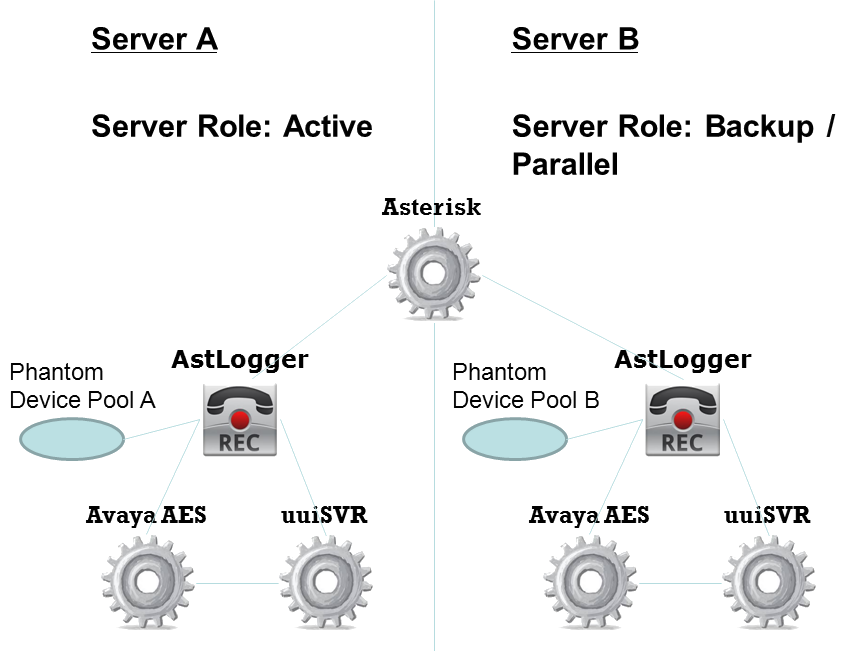
New version of AstLogger can be configured with redundancy support. Three server roles are designed, they are “active”, “backup” and “parallel”. I use the following diagram to illustrate the different combination of redundancy implementation.

RedundancyDesign.png

Active Hot-Standby Recording

Two AstLogger servers are required for this setup. The two AstLogger instances connect to different AES to avoid single point of failure. Also the two AstLogger instances use different pool of phantom devices. The “active” AstLogger always trigger recording when it is alive. The “backup” AstLogger only trigger recording when it detects the “active” AstLogger is failure. Only one voice file is generated for each call by this implementation.

Active Active Recording

Two AstLogger servers are required for this setup. The two AstLogger instances connect to different AES to avoid single point of failure. Also the two AstLogger instances use different pool of phantom devices. The “active” AstLogger always trigger recording when it is alve. The “parallel” AstLogger always start the recording right after the “active” AstLogger. Two voice files are generated for each call by this implementation.

1.4.10 Beta 1

You can download 1.4.10 beta 1 for testing of this new feature. A new parameter called “al_serverrole” is introduced for this purpose, the value can be “active”, “backup” and “parallel”.

AstLogger 1.4.8 Released

Posted: June 23, 2016 in Asterisk, News, TSAPI

23 Jun 2016, AstLogger 1.4.8 just released. This version 

1. Supports call log centralization by integration with CallAban.
2. The logic for application data logging is modified. Only the modified data item will be saved to database.
3. Fixed a bug that AstLogger will not startup successfully before AES startup.
4. Fixed a bug that AstLogger will not startup successfully before Asterisk startup.
5. Supports pauserecording and unpauserecording function by the REST interface.

AstCTI 1.1.0 Released

Posted: December 23, 2015 in Asterisk, News

23 Dec 2015, AstCTI 1.1.0 just released. This version only supports start or stop monitoring agent extensions and delivers the channel events by ActiveX and WebSocket interfaces. I plan to implement a my queue using ARI so all incoming calls will go into my queue, then all calls can be controlled by my supported interfaces such as ActiveX, REST and  WebSocket. I guess it will take a very long time to implement.

The Asterisk CTI implementation has some progress. I have developed a CTI server called AstCTI which connects to Asterisk using ARI and accepts client connections by interfaces such as WebSocket, OCX and REST. I just developed the OCX interface, currently the OCX interface only supports Connect, Disconnect, StartMonitor and StopMonitor methods. Also, it has an OCX event interface called OnJSONEvent for JSON events which are delivered from Asterisk.

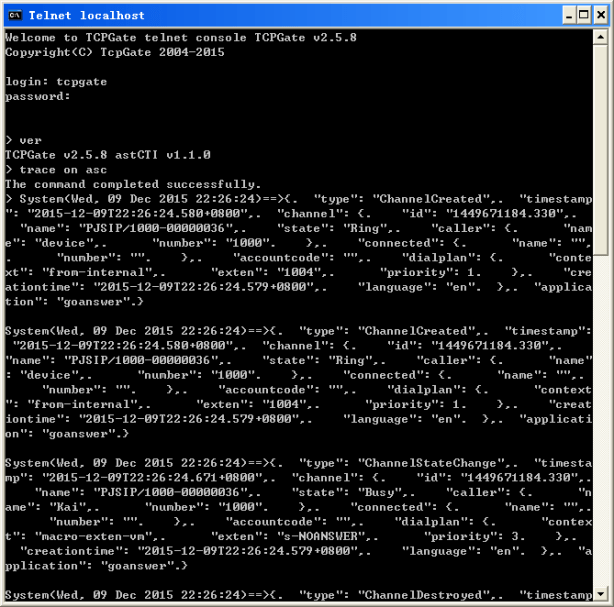
The AstCTI is a Windows Service program, it uses tcpgate console for program configuration and message tracing

AstCTI

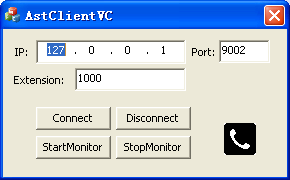
I also developed a VC program for testing. The telephony icon on the VC program is the OCX that I mentioned above.

AstClientVC

Next I will develop the WebSocket interface and study the call control functions such as MakeCall, Hangup, Transfer and Conference, etc.

AstLogger 1.4.7 Released

Posted: November 11, 2015 in Asterisk, News, TSAPI

11 Nov 2015, AstLogger 1.4.7 just released. A new module called AstLogger Archive Daemon is introduced, it supports the following features:

  1. Archiving of recording files for AstLogger.
  2. Deletion of recording files when harddisk utilization reached a predefined level
  3. Deletion of recording files when files are created before a retention period

The AstLoggerWeb is modified to search archive path when the recording file is delete from the working path. This version also fixed a bug on the websocket mask bit and mask key handling.