Archive for the ‘News’ Category

upDialer 1.2.0 Released

Posted: July 3, 2024 in News, TSAPI

upDialer 1.2.0 just released, this version has the following updates:

1. Add “setup”, “setup database”, “setup API” and “setup splunk” commands for program configuration.
2. Add “add dialeruser”, “delete dialeruser” and “disp dialeruser” commands. Before that, the users are defined in the tcpgate admin user database table.
3. A role is associated with each dialeruser. Four standard user roles are defined, they are agent, supervisor, manager and admin. Some functions are limited to supervisor privilege or above only.
4. Add cancelcallitems API to cancel call items of a job.
5. Add listcallcitems API to list call items of a job. The listing supports “active” or “all” call item listing.
6. Add WebSocket “call back start” and “call back cancel” events notification during dialer callback.
7. Support add call items with specific schedule calling time. The dialling will be started after the schedule time (UNIX time stamp).

clintSVR 2.2.1 Released

Posted: June 30, 2024 in CMS, News

clintSVR 2.2.1 just released, this version has the following updates.

1. Supports integration with bcmsSVR to provide number of ACD calls (whole day) of each agent for the API splitskillsla.
2. Change the clint “Exit” command to “logout” for faster logout of clint command.
3. Change the historical report time range from 00:00-23:30 to 00:00-23:59.
4. Add telnet “setup”, “setup database”, “setup api” and “setup aplunk” commands for clintSVR configuration.
5. Add custom historical report “uphisallsplitskillagentsummary” which provides a whole day agent summary data of all split skills. The number of ACD calls (whole day) of each agent for the API splitskillsla is supported.
6. Add custom real-time report “uprtallspskreport” which provides all real-time split skill report of a ACD. This version only provides the data via REST interface.
7. Add custom real-time report “uprtallagentstatus” which provides all real-time agent status of a ACD. This version only provides the data via REST interface.
8. Add a parameter “cs_hisreport_refreshstartpoint” for custom historical report “uphisallsplitskillagentsummary”. Before that start point, the cache result timestamp is updated to keep the cache alive.
9. Replace the parameter “cs_splitskillsla_freezingpoint” with “cs_hisreport_refreshstoppoint”. During the stop point, the cache result timestamp is updated to keep the cache alive.

AvayaCDR 1.7.0 Released

Posted: June 28, 2024 in Avaya CDR, News

Avaya CS1K CDR is now supported by AvayaCDR 1.7.0!

AvayaCDR can capture CS1K CDR from COM port  or network network TCP streaming. This version has the following updates:

1. Supports capture CDR records from serial COM port. Supports generic and cs1klf (Avaya CS1000 with NEW format with line feed records) formats.
2. Supports TCP streaming of CDR from Avaya CS1000 with NEW format with line feed records, the paramcdr template called cs1klf is newly introduced.
3. Add new command rotate to rotate the remote database error log file.

CallAnalytics 2.2.0 Released

Posted: June 17, 2024 in News, TSAPI

CallAnalytics 2.2.0 just released, this version has the following updates.

1. Add “setup”, “setup api”, “setup database” and “setup splunk” commands for program configuration.
2. Fix the “disp tlink” and “disp activetserver” commanads.
3. Fix the Linux 64 bit version “setuserdata” API bug due to basic type size difference in Windows and Linux.
4. Able to set the telnet port by installation parameter -listenport.

AutoBridge 1.2.0 Released

Posted: June 17, 2024 in News, TSAPI

AutoBridge 1.2.0 just released, this version has the following updates:

1. Add a new parameter to control the setup of outbound call bridging when the destination is in alert state. The bridging may fail when the trunk is not supported the conferencing of the called party during alert state. The parameter is called “ab_bridgingstartedbydelivered”.
2. Poll agent phone status regularly and release it to the available pool when no agent is engaging the phone.
3. Add tcpgate console commands “setup” and “setup api” for program configuration.
4. Add inbridge for inbound call bridging based on caller number.
5. Add outbridge fro outbound call bridging based on called number.
6. Add “disp tlink” and “disp activetlink” commands to check TSAPI tlink information.

AvayaECHI 1.2.2 Released

Posted: May 31, 2024 in CMS, News

AvayaECHI 1.2.2 just released, this version has the following updates:

1. Supports multiple instances on the same host machine.
2. Add “setup”, “setup database” and “setup splunk” commands for program configuration.
3. Add -telnetport as installation parameter to override the telnet port for Windows.
4. Add -telnetport as program argument to override the telnet port for Linux.

AvayaCDR 1.6.0 Released

Posted: May 25, 2024 in Avaya CDR, News
  1. Add parameters cdr_extlog_smcdrdate, cdr_extlog_smcdrtime and cdr_extlog_smcdrduration to set Session Manager extended logging fields.
  2. The sftp module supports archive sftp files for each sftp host.
  3. The sftp remark field can be used for extended logging when parameter cdr_extlog_sourceinfo is set to true.
  4. CDR format 6.3.4flat and 6.3.4enhanced are newly introduced.
  5. Can set the telnet port by installation parameter -listenport.
  6. The commands “import cdrfile” and “import cdrdir” support extended logging fileds.
  7. Fixed a potential bug in Linux platform that the import paramcdr command failed due to unable delete old paramcdr parameters.
  8. Fixed the parameter from minutes to seconds.
  9. Support import of raw Session Manger sftp raw files from local host.

bcmsSVR 2.3.0 Released

Posted: May 7, 2024 in BCMS, News

bcmsSVR 2.3.0 just released, this version has the following updates.

1. Fixed the totalPercentWithinServiceLevelDay value as -1(undefined) when the service level is zero but with abandoned calls.
2. Support multiple instances of bcmsSVR on the same machine.
3. Add AUX0-AUX9 for bcmsmonitorsplitagentstats API
4. Merge the APIs bcmsmonitorsplitsla and bcmsmonitorsplitagentstats, the final one is bcmsmonitorsplitsla. No modification for API bcmsmonitorsplitagentstats in the futurer.
5. Add bcmslistsummaryagentday fields for each agent in the API bcmsmonitorsplitsla.
6. Modify bcmsmonitorsplitstatus to handle CTI integration similar to API bcmsmonitorsplitsla.
7. Add “setup”, “setup database”, “setup api” and “setup splunk” commands for program configuration.

AvayaCDR 1.5.25 Released

Posted: May 4, 2024 in Avaya CDR, News

AvayaCDR 1.5.25 just released, this version has the following updates.

1. Support multiple instances on Windows and Linux platforms.
2. Add “setup“, “setup database“, “setup cdrport” and “setup splunk” commands for program configuration.
3. Applied local guard to the telnet command to avoid deadlock of mutex.

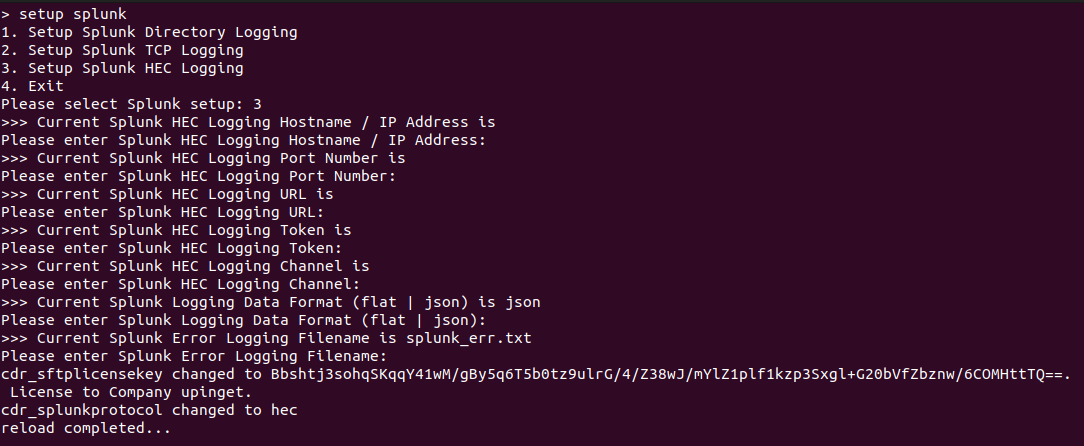
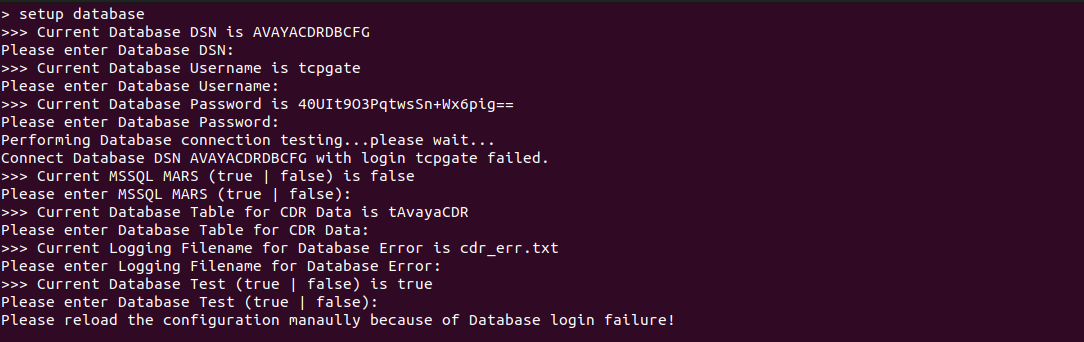
The setup commands help the administrator configure the software very easily. Once logged in to the tcpgate console, enter the following commands to configure the software.

  • To configure the basic setup, enter “setup“.
  • To configure the database logging, enter “setup database“.
  • To configure the listening port, enter “setup cdrport“.
  • To configure the Splunk logging, enter the “setup splunk

If you would like to have a trial, please contact us.

CallAnalytics 2.1.4 Released

Posted: April 4, 2024 in News, TSAPI

CallAnalytics 2.1.4 just released, this version has the following updates.

1. Add disp tlink, activetlink and switchtlink commands.
2. Add parameter ca_appname to specify the application name in the AES.
3. Add LastCallRetrieveLessThanCertainSeconds() function for Compliance Manager.
4. Add ExtensionCallAnswerDuration() function for Compliance Manager.
5. Add ProcessExtensionActiveMonitorConferenceCall() and ProcessExtensionSilentMonitorConferenceCall() functions for Compliance Manager.
6. Add ProcessNewExtensionCall(), ProcessExtensionHoldCall() and ProcessExtensionRetrieveCall() functions for Compliance Manager.
7. Only change the vector processing flag to false if the call is not in the CS_QUEUED state.
8. Support multiple instances on the same machine, a separate license key is required for each instance.