28 Jan 2016, ivrSVR 1.1.7 just released. This version supports additional call control functions such as clearCall, snapshot and queryACDSplit. This version also supports get, set and update of user data by hex-encoded UUI. I recently found that the TSAPI UUI field can be passed between Avaya and Asterisk and it is in the form of hex-encoded UUI. In Asterisk IVR call flow, user data can be retrieved by calling ivrSVR REST interface with the hex-encoded UUI as parameter. When Asterisk IVR transfers the call back to agent who sits on the Avaya side, the IVR can update the user data by the ivrSVR REST interface. By using this way, we can pass user data between Avaya and Asterisk very easily.
Archive for the ‘TSAPI’ Category
Introduction
The astCTI is a CTI server for Asterisk. The astCTI uses ARI to monitor agent extensions, it hides the technical details of ARI and provides ActiveX, REST and WebSocket interfaces for front end application development. Currently, the astCTI program only supports the following functions:
- StartMonitor – Start monitor of agent extension
- StopMonitor – Stop monitor of agent extension
- MakeCall – Make a call
- Hangup – Hangup a call
- Snapshot – Snapshot a device
Testing Program
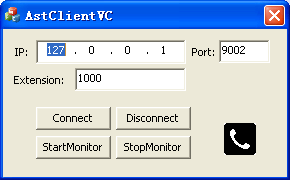
- I have prepared a testing program called “AstClientVC.exe” which uses the ActiveX to connect to the astCTI, the screenshot of the program is
Preparation and Password Encryption
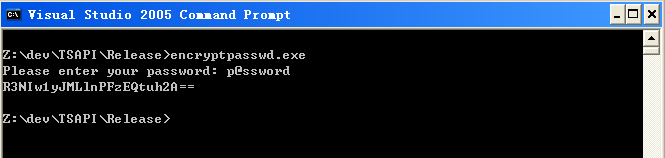
- The access MDB file stored the ARI username and password of Asterisk server. For security reason, a tool called encryptpasswd.exe is provided for you to generate an encrypted password for the installation and configuration of the software
- Execute the program, generate an encrypted password for the ARI user of Asterisk server, then paste the encrypted password to the parameter ivr_tlink. For example, the encrypted password for “p@ssword” is “R3NIw1yJMLlnPFzEQtuh2A==”

64 bit Windows System
- For 64 bit Windows system, please follow the steps below
- Configure ODBC System DSN using
- C:\Windows\SysWOW64\odbcad32.exe
- Stop the Windows firewall because it enables by default and telnet port 14021 is required for this application.
- Configure ODBC System DSN using
Installation
- Download the astCTI zip file here.
- Follow the installation steps below to install the software.
- Extract all the files into directory c:\program files\astCTI
- Open Windows Command Prompt, enter the following commands to register the program as Windows Service
- cd c:\program files\astCTI
- astCTI -i
- Open ODBC Setting, create a System DSN called ASTCTICFG for Microsoft Access Driver and point to astcti.mdb which is located in the directory c:\program files\astCTI
- Open the Access file, edit the value of parameters acti_tlink_01 and acti_tlink_02 to define the ARI parameters of your Asterisk servers in the tParameter table. The format is ip#port#app,username,encryptpasswd. For example, my setting is 192.168.1.124#8088#astcti,astcti,R3NIw1yJMLlnPFzEQtuh2A==
- Start the Windows Service astCTI
- Telnet to localhost and port number 14021, enter username tcpgate and password tcpgate01 to access the program console
- Enter the following command to add extension and monitored by astCTI
- add extension 101 PJSIP
- Hint: add extension 101 and monitored by astCTI
- Hint: extension 101 is using technology PJSIP, you can use technology SIP
- Enter the following command in the program console to modify the default technology type of added extension
- update parameter acti_defaultexttype PJSIP
- Enter the following command in the program console, you will receive debug information
- trace on asc
- Enter the following command in the program console, you will get the help message
- help
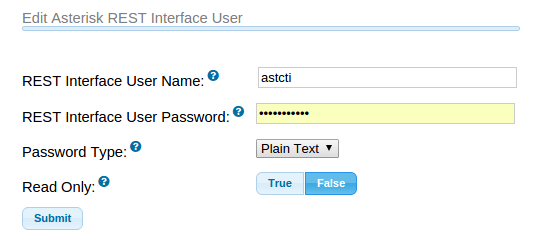
Add Asterisk REST Interface User
- The following screenshot is for FreePBX only

REST Interface
- Enter the following command in the program console to add an ActiveX interface port
- add tcp 9001 * * custom astctirest
- ACD Login
- ACD Logout
- ACD SetState
- MakeCall
- Answer
- Hangup
- Hold
- Retrieve
- Transfer
- Conference
- Consultation
- Reconnect
- Alternate
- DTMF
- UserData
- Snapshot
ActiveX Interface
- Enter the following command in the program console to add an ActiveX interface port
- add tcp 9002 * * custom astctiapi
WebSocket Interface
- Enter the following command in the program console to add a WebSocket interface port
- add tcp 9003 * * custom astctiws
- WebSocket interface accepts JSON request, returns JSON response and delivers unsolicited JSON events
- The JSON strings for MakeCall request and response are
- {id: “1”, request: “makecall”, extension: “101”, destination: “102”, data: “hello”}
- {msgtype: “response”, id: “1”, result: “success”, channel: {name: “channelname”, id: “channelid”}}
- The JSON strings for Hold call request and response are
- The JSON strings for Retrieve call request and response are
- The JSON strings for Hangup call request and response are
- {id: “2”, request: “hangup”, extension: “101”, data: “world”}
- {msgtype: “response”, id: “2”, result: “success”, channel: {name: “channelname”, id: “channelid”}}
- The JSON strings for Answer call request and response are
- The JSON strings for Consultation call request and response are
- The JSON strings for Reconnect call request and response are
- The JSON strings for Alternate call request and response are
- The JSON strings for Transfer call request and response are
- The JSON strings for Conference call request and response are
- The JSON strings to send DTMF request and response are
- The JSON strings for ACD Login request and response are
- The JSON strings for ACD Logout request and response are
- The JSON strings for ACD SetState request and response are
- The JSON strings for StartMonitor extension
- {id: “15”, request: “startmonitor”, extension: “101”}
- {msgtype: “response”, id: “15”, result: “success”, error: “”}
- The JSON strings for StopMonitor extension
- {id: “16”, request: “stopmonitor”, extension: “101”}
- {msgtype: “response”, id: “16”, result: “success”, error: “”}
- The JSON strings for Alert UserData request and response are
- The JSON strings for Hangup UserData request and response are
- Please refer this post for JSON events
Uninstallation
- Stop the Window Service astCTI
- Open Windows Command Prompt, enter the following commands to uninstall the program from Windows Service
- cd c:\program files\astCTI
- astCTI -u
Support and License
- Please contact upinget.com for support and license
11 Nov 2015, AstLogger 1.4.7 just released. A new module called AstLogger Archive Daemon is introduced, it supports the following features:
- Archiving of recording files for AstLogger.
- Deletion of recording files when harddisk utilization reached a predefined level
- Deletion of recording files when files are created before a retention period
The AstLoggerWeb is modified to search archive path when the recording file is delete from the working path. This version also fixed a bug on the websocket mask bit and mask key handling.
9 Oct 2015, ivrSVR 1.1.5 just released. This version fixed a bug that the program only monitors the first extension after TSAPI reconnect or service restart.
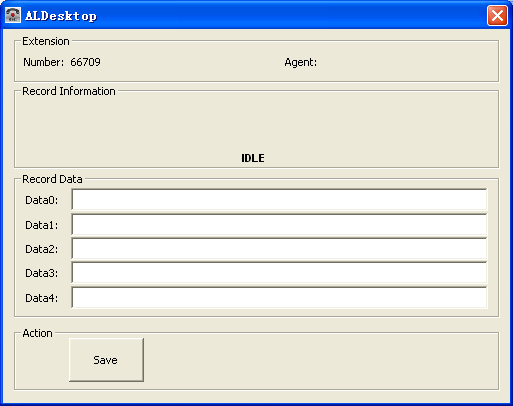
I have developed an application called AstLogger Desktop which is run on the PCs of call center agents. This application is for logging of business data that associated with call records of AstLogger. When you search call records using AstLoggerWeb, the data which is logged can be displayed together with the call information. By the way, this application is FREE. Also, the source code is here.
ScreenPop 1.4.2 and AstLogger 1.4.6 are also released for this application.
18 Sep 2015, ScreenPop 1.4.1 just released. This version supports link reconnect between ScreenPop.ocx and ScreenPop.exe, ScreenPop.ocx is integrated with calltoui.exe to show CLI and DNIS information. Moreover, temp license key can be arranged by the license server.
5 Jun 2015, AstLogger 1.4.5 just release. This version supports REST and WebSocket interfaces. Moreover, it supports playback and control playback of voice records using Avaya phones when Asterisk 12 or above is used.
Next version of AstLogger will support CentOS and archiving of voice files to a backup location such as NAS.
The AstLogger 1.4.4 just released. This version supports add/delete of stations/acds/phantoms by scanning of database change. Two parameters called “al_scandbconfig” and “al_scandbconfiginterval” are added for this purpose. To enable this feature, set parametr “al_scandbconfig” to value “yes”. The scanning interval is specified in seconds. Also, this version improved logging mechanism by considering of change of callid during the logging process.
ivrSVR 1.1.4 just released. This versions support OCX interface so you can use the provided OCX to developed VB and VC applications. The OCX hides all the details of low level programming, you only need to set the OCX properties such as Host and Port, then invoke the Connect() function to connect to the server. Once the server is connected, you can call CTI functions such as MakeCall, Hangup, Hold, etc. Apart from the new feature, this version also fixed a minor bug which the response JSON message is not correct for the JSON command userdata.
10 March 2015, the AstLogger 1.4.3 just released, this version fixed a bug that the application crashed when it cannot reach Asterisk but connected to an invalid endpoint. Also, the logger will clear connection with Asterisk when the logger cannot complete the logging procedure. Better email notification subject is used for email notification.
 UPINGET